Edifier R1280T Powered Bookshelf Speakers 42W Studio Monitor vs PreSonus Eris E3.5: Which Is Actually Worth Your Money in 2026?
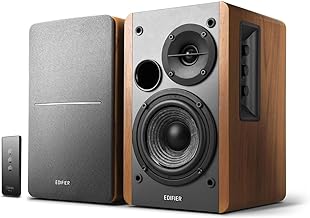
The Quick Answer
If you're a home-studio creator, podcaster, or desk-bound professional who wants a warm, room-filling sound without extra cables or an audio interface, the Edifier R1280T wins on convenience. It delivers 42W RMS total through a classic 2-way wooden-cabinet design, and the included remote handles volume, mute, and bass/treble adjustment from your desk. The PreSonus Eris E3.5 is built for a different job — a genuine near-field studio monitor meant for critical mixing, with a flatter response and more input options, but no remote and a tighter, more revealing sound that isn't as forgiving for casual listening. If you mainly want pleasant desk speakers, the R1280T is the easier buy. If you're mixing or recording and need to hear what's actually in the track, the Eris E3.5 is the right tool.
What Each Option Does Best — and the Use Case It's Built For
| Feature | Edifier R1280T | PreSonus Eris E3.5 |
|---|---|---|
| Core Sound Signature | Warm, bass-leaning 2-way design, tuned more for pleasant listening than flat accuracy. | Neutral, near-field monitor voicing designed to reveal detail rather than flatter it. |
| Power | 42W RMS total (2-way active amp). | 50W total (25W per side, Class AB). |
| Frequency Response | 52Hz–20kHz. | 80Hz–20kHz — noticeably less low-end extension than the R1280T; PreSonus expects you to add a subwoofer if you need real bass for mixing. |
| Drivers | 4" mid/bass woofer + 0.5" silk-dome tweeter. | 3.5" woven-composite low-frequency driver + 1" silk-dome tweeter — physically smaller drivers than the R1280T's. |
| Connectivity | Dual RCA inputs only. | Rear 1/4" TRS + RCA, plus a front-panel 1/8" stereo input — more flexible for laptops, mixers, and audio interfaces. |
| Controls | Front-panel bass/treble knobs plus an included remote for volume and mute. | Rear-panel volume knob and high/low Acoustic Tuning controls; no remote. |
| Peak SPL | Not officially published by Edifier. | 98 dB @ 1 meter. |
| Physical Footprint | Wood-veneer bookshelf enclosure, sized to sit comfortably on a shelf or desk corner. | Compact MDF cabinet, designed to sit closer to your ears on a monitor stand. |
| Target Audience | Podcasters, streamers, and anyone who wants good sound with minimal setup. | Musicians, audio engineers, and producers who need an honest reference for mixing. |
The R1280T is built for pleasantness — a warmer low end and simple controls that work well for casual listening and voice-over playback. The Eris E3.5 is built for accuracy — a flatter curve and near-field design meant to expose problems in a mix rather than smooth them over.
Feature-by-Feature Breakdown (The Differences That Actually Matter)
1. Power and Driver Design
The two aren't actually built the same way, despite looking similar on a spec sheet. The R1280T pairs a 4" mid/bass woofer with a 0.5" silk-dome tweeter in a larger wood cabinet, giving it real low-end extension down to 52Hz. The Eris E3.5 uses smaller drivers (a 3.5" woven-composite woofer and 1" tweeter) in a more compact enclosure, and PreSonus doesn't try to chase deep bass with it — the E3.5's official frequency response bottoms out at 80Hz, meaningfully higher than the R1280T's. That's a deliberate near-field monitor design choice, not a shortcoming: PreSonus expects serious mixing setups to add a subwoofer rather than ask a 3.5" driver to fake low-end it can't cleanly produce.
2. Frequency Response and What It Means for Mixing
On paper the Eris E3.5 (80Hz–20kHz) actually covers less low-frequency range than the R1280T (52Hz–20kHz) — the opposite of what you might assume from PreSonus's "studio monitor" branding. What the Eris offers instead is a flatter, more honest midrange and treble, which is what actually matters for catching problems in a mix (harshness, muddiness, panning issues). The R1280T's extra bass extension makes casual listening more pleasant but can mask exactly the kind of low-end issues a mixing engineer needs to hear clearly.
3. Connectivity and Expandability
The R1280T sticks to dual RCA inputs only — no Bluetooth, no 1/4" jacks. That's a simple, reliable analog path, but it means you're tied to whatever gear has RCA outputs. The Eris E3.5 is more flexible: rear 1/4" TRS and RCA inputs plus a front-panel 1/8" stereo jack, so it connects directly to an audio interface, a mixer, or a laptop headphone-out without adapters. Neither speaker has Bluetooth built in.
4. Controls
The R1280T's included remote is the more convenient day-to-day setup — volume, mute, and tone adjustment from your desk without reaching for the speaker. The Eris E3.5 has no remote; volume and its high/low Acoustic Tuning switches live on the back panel, which is normal for studio monitors (you set them once for your room, then leave them alone) but less convenient if you're using them as everyday desk speakers.
Bottom Line
Neither speaker is "better" in the abstract — they're built for different jobs. The R1280T is the easier, warmer, more room-filling choice for casual listening, streaming, and voice-over work. The Eris E3.5 is the more honest tool for anyone actually mixing or recording, at the cost of convenience and low-end punch.
We don't test speakers in-house — this comparison is built from each manufacturer's published specifications, cross-checked across multiple retailer listings.
Connection, audio, light, camera, desk and power, in the order that matters. Free 2-page PDF, no spam.
No spam. Unsubscribe anytime.
Edifier R1280T Powered Bookshelf Speakers
Our pick, based on published specs and owner reviews — not hands-on testing.
Check Price on Amazon →Founder of The Workflow Guide — an IT professional who researches home-office gear and productivity software from specs, documentation and published reviews. Full bio →