Roost V3 Laptop Stand: Full Rundown (2026)
This is an affiliate link — we may earn a commission at no extra cost to you.
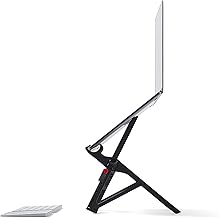
The Roost V3 is a portable, foldable laptop stand built for people who work from more than one location — it's designed to raise your laptop screen to a healthier viewing height while packing down small enough for a bag. This is based on manufacturer specifications and published spec-sheet data; we don't test desk gear in-house.
Who it's for
Good fit for anyone who works from coffee shops, coworking spaces, or travels regularly and wants proper laptop ergonomics without carrying a bulky stand. Skip it if you work from one fixed desk — a heavier, cheaper stationary stand or monitor arm will do the same ergonomic job for less money.
Specs
| Spec | Roost V3 Laptop Stand |
|---|---|
| Weight | Around 1 lb |
| Folded size | Compact enough to fit in most bag pockets |
| Height adjustment | Multiple height settings |
| Material | Aluminum arms and hinges |
| Compatibility | Laptops from roughly 11" to 17" |
What stands out
The core selling point is the folding mechanism — it collapses down to roughly the size of a large pen case, which is unusual for a stand that still holds a laptop securely at a real ergonomic height. For people who genuinely move between locations, that's the difference between actually using a stand and leaving it at home because it's too bulky to carry.
What to know before buying
Like any laptop-only stand, you'll need a separate external keyboard and mouse to type comfortably once the laptop is raised — otherwise you're just looking at the screen at a better angle while your wrists are elevated too. It's also a premium price for what is, mechanically, a folding frame, so if portability doesn't matter to you, cheaper stationary stands offer similar height adjustment for less.
Bottom line
For frequent travelers and coworking-space regulars who want real ergonomics without extra bulk, the Roost V3's folding design earns its price. For a single fixed desk setup, a cheaper stationary stand does the same job.
Check the current price on the Roost V3 Laptop Stand →
The Workflow Guide publishes independent research on tech tools and gear. We do not test desk gear in-house; this page is based on manufacturer specifications and published spec-sheet data.
Connection, audio, light, camera, desk and power, in the order that matters. Free 2-page PDF, no spam.
No spam. Unsubscribe anytime.
Roost V3 Laptop Stand
Our pick, based on published specs and owner reviews — not hands-on testing.
Check Price on Amazon →Founder of The Workflow Guide — an IT professional who researches home-office gear and productivity software from specs, documentation and published reviews. Full bio →