Blue Yeti USB Microphone (Midnight Blue): Specs, Features & Who It's For (2026)
This is an affiliate link — we may earn a commission at no extra cost to you.
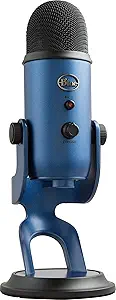
The Blue Yeti is one of the best-known USB microphones ever made. It first came out in 2009 [3], is now supported by Logitech, which publishes its current specifications [1], and Midnight Blue is one of its colour options — the microphone inside is the same Yeti. Its appeal hasn't changed much: plug it into USB, pick one of four pickup patterns, and record. This page is based on Logitech's published specifications and independent reviews; we don't test microphones in-house.
Quick verdict
For one person recording voice in a reasonably quiet room — calls, podcasts, voiceover, streaming — the Yeti is a proven, versatile pick. Digital Camera World gave it five stars, calling it "excellent value for money as it's sturdily built, sounds great and lasts for years" [2]. It's a big, heavy desk mic, and it has no XLR output, so it can't grow into an audio-interface setup later [3].
Full specs
| Spec | Blue Yeti |
|---|---|
| First released | 2009 [3] |
| Type | Condenser, USB [1][3] |
| Capsules | 3 × 14mm Blue-proprietary condenser capsules [1] |
| Polar patterns | Cardioid, bidirectional (figure-8), omnidirectional, stereo [1] |
| Frequency response | 20Hz–20kHz [1] |
| Max SPL | 120dB (0.5% THD at 1kHz) [1] |
| Recording format | 16-bit / 48kHz [1] |
| Power | 5V, 150mA over USB [1] |
| Headphone output | Yes — 16 ohm, 130mW, zero-latency monitoring [1][2] |
| Controls | Gain knob, mute button, headphone volume, pattern selector [2][3] |
| Size (in stand) | 12 × 12.5 × 29.5 cm (4.72 × 4.92 × 11.61 in) [1] |
| Weight | Mic 0.55 kg (1.2 lb) + stand 1 kg (2.2 lb) [1] |
| XLR output | No [3] |
The four pickup patterns, in plain terms
The three capsules let the Yeti switch between four patterns [1]:
- Cardioid — picks up what's directly in front of the mic. Use this for calls, solo podcasts, voiceover, and streaming. It's the right setting almost all the time.
- Bidirectional (figure-8) — picks up front and back, not the sides. Useful for a two-person interview across a table from one mic.
- Omnidirectional — picks up all around. For a group around a table, or room ambience.
- Stereo — left/right image, for recording instruments or ambient sound.
What reviewers highlight
- Sound and build. Digital Camera World praises its "excellent sound quality," "mostly metal construction," and durability [2].
- Versatility. The four patterns let one mic cover solo, interview, and group recording [2][3].
- Plug and play. No drivers or setup — Front Desk Review highlights "easy plug-and-play setup, no drivers or manual tweaking" [3].
What to know before buying
- Room noise. The Yeti is a condenser mic, and condenser mics pick up more of the room — keyboard clicks, fans, echo — than dynamic mics designed for voice. In an untreated or noisy room, keep it in cardioid mode and position it close to your mouth.
- Plosives. It's prone to pops on "p" and "b" sounds, so a pop filter helps [3].
- Hum from the base. Digital Camera World's one con: thin pads on the base can transmit hum from your desk [2]. A boom arm or a mat under the stand solves it.
- Size and weight. At about 1.55 kg with its stand and nearly 30 cm tall [1], it takes up real desk space. Many owners move it to a boom arm.
- USB only. There's no XLR output, so it can't be plugged into an audio interface later [3]. If you think you'll upgrade, a USB/XLR hybrid like the Shure MV7+ avoids buying twice.
- 16-bit / 48kHz. The Yeti records at 16-bit/48kHz [1] — standard for calls, streaming, and podcasts. Some newer USB mics record at 24-bit, so check the spec if you plan heavy editing.
FAQ
What are the Blue Yeti's specs? Three 14mm condenser capsules, four polar patterns, 20Hz–20kHz frequency response, 16-bit/48kHz recording, 120dB max SPL, USB powered [1].
When was the Blue Yeti released? 2009 [3].
Is the Midnight Blue Yeti different from the standard Yeti? It's a colour option of the same microphone — the specs above apply.
How much does the Blue Yeti weigh? The microphone is 0.55 kg and the stand is 1 kg, about 1.55 kg together [1].
Does the Blue Yeti work with Zoom and Teams? Yes — it's a standard plug-and-play USB microphone [3].
Bottom line
The Yeti earned its reputation: a versatile, well-built USB microphone that sounds good with zero setup. Use it in cardioid mode in a quiet room, budget for a pop filter or boom arm, and skip it if you expect to move to an XLR setup later.
Check the current price on the Blue Yeti →
See also
- Best USB microphones for podcasting and remote work (2026)
- Focusrite Scarlett Solo — for an XLR setup
Sources
- Capsules, polar patterns, frequency response, max SPL, sample rate, bit depth, power, headphone amp, dimensions, weights — Logitech Support, Specifications – Yeti
- Five-star verdict, sound and build quality, controls, headphone monitoring, base-hum con — Digital Camera World, Blue Yeti USB Microphone review
- 2009 release, condenser/USB type, plug-and-play, prone to pops, no XLR output — Front Desk Review, Blue Yeti specs and price
The Workflow Guide publishes independent research on tech tools and gear. We do not test microphones in-house; this page is based on manufacturer specifications and published professional reviews.
Connection, audio, light, camera, desk and power, in the order that matters. Free 2-page PDF, no spam.
No spam. Unsubscribe anytime.
Blue Yeti USB Microphone Midnight Blue
Our pick, based on published specs and owner reviews — not hands-on testing.
Check Price on Amazon →Founder of The Workflow Guide — an IT professional who researches home-office gear and productivity software from specs, documentation and published reviews. Full bio →