RODE PodMic USB Broadcast Microphone: Full Rundown (2026)
This is an affiliate link — we may earn a commission at no extra cost to you.
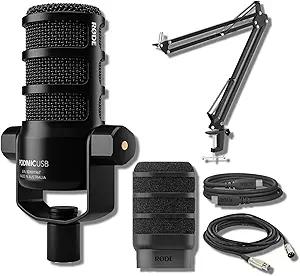
The RODE PodMic USB is a dynamic broadcast microphone with both XLR and USB-C outputs, so it can plug straight into a computer or into an audio interface [1]. It keeps the solid all-metal build of the original XLR-only PodMic and adds on-board processing and RODE's software suite over USB [1][2]. TechRadar lists it at $199.99 [1]. The listing we link to is a bundle that also includes RODE's BOOMARM1 desktop boom arm and a 10-foot XLR cable [2]. This page is based on manufacturer information and published professional reviews; we don't test microphones in-house.
Quick verdict
TechRadar found it "sounds pretty good right out of the box" through either connection, praised the construction as "absolutely fantastic," and called the USB-C setup about as simple as it gets [1]. The catch is price: at about double the original PodMic, it competes with mics like the Shure MV7 without a standout advantage [1] (we cover the newer Shure MV7+ separately). Buy it if you want one mic that works with a laptop today and an interface later.
Full specs
| Spec | RODE PodMic USB |
|---|---|
| List price | $199.99 (mic) [1] |
| Type | Dynamic, cardioid [1][2] |
| Outputs | XLR and USB-C [1] |
| Sample rate (USB) | 48kHz [1] |
| Processing | On-board APHEX DSP over USB [2] |
| On-mic controls | Headphone monitoring level wheel only [1] |
| Monitoring | Headphone monitoring with on-mic level wheel [1] |
| Weight | 1.9 lb / 900g [1] |
| Software | RODE Central, RODE Connect, RODE Unify (USB only) [1] |
| In this bundle | PodMic USB, BOOMARM1 desktop boom arm, 10 ft XLR cable [2] |
What stands out
- One mic, two paths. Start over USB-C straight into a laptop, and move to XLR and an audio interface later without buying a new mic [1].
- Broadcast-style rejection. As a cardioid dynamic mic, it rejects keyboard clatter and desk knocks well; TechRadar found the shock mount suppressed knocks "admirably" [1]. That matters more on calls than raw fidelity.
- Build quality. All-metal at 900g with a hinged mounting bracket — TechRadar likens holding it to "studio equipment" [1].
- The bundle fixes a gap. TechRadar noted the mic doesn't come with a stand [1]; this bundle includes the BOOMARM1 [2], so there's nothing else to buy for desk use.
What to know before buying
- Price over the original. TechRadar calls it "double the price of the XLR-only model," which undercuts the original PodMic's value appeal [1].
- Mid-forward sound. TechRadar found the tuning favours the mid-range and lacks a little high-end sparkle out of the box; EQ fixes it [1].
- Software only over USB. Using XLR means giving up RODE Central, Connect, and Unify [1].
- No simultaneous USB + XLR recording [1].
- Minimal controls. A monitoring level wheel is the only on-mic control — no mute button or gain slider [1].
- It's heavy. At 900g it needs a sturdy arm — the bundled BOOMARM1 or something like the RODE PSA1 [1][2].
Who it's for
- Good fit: podcasters, streamers, and remote workers who want a broadcast-style mic that tames room and keyboard noise, and may add an interface later.
- Maybe: first-time podcasters on a budget — the XLR-only PodMic plus an interface, or a cheaper USB mic, may be better value.
- Skip it: if you want hardware mute and gain controls on the mic itself.
FAQ
Does the RODE PodMic USB work without an audio interface? Yes — plug it into a computer over USB-C [1].
Can it record over USB and XLR at the same time? No [1].
Does the PodMic USB come with a stand? The mic alone doesn't [1]; the bundle we link includes the BOOMARM1 boom arm and a 10 ft XLR cable [2].
Is it a dynamic or condenser mic? Dynamic, with a cardioid pattern [1][2].
Bottom line
The PodMic USB is a well-built, easy-to-use broadcast mic that grows with you from USB to XLR, and it handles noisy home-office desks well. Its price is its weak point — weigh it against the Shure MV7 family and the original PodMic before buying.
Check the current price on the RODE PodMic USB →
See also
- Best USB microphones for podcasting and remote work (2026)
- Shure MV7+
- Focusrite Scarlett Solo (4th gen)
Sources
- $199.99 list price, XLR + USB-C, cardioid, 48kHz over USB, 900g / 1.9 lb, monitoring wheel as the only control, RODE Central / Connect / Unify over USB only, no stand included, no simultaneous USB + XLR recording, mid-focused tuning, noise rejection and shock mount, build quality, price vs original PodMic and Shure MV7 — TechRadar, Rode PodMic USB review
- Dynamic cardioid USB-C mic with APHEX DSP; bundle with BOOMARM1 desktop boom arm and 10-foot XLR cable — Amazon listing for the RODE PodMic USB + BOOMARM1 bundle
The Workflow Guide publishes independent research on tech tools and gear. We do not test microphones in-house; this page is based on manufacturer information and published professional reviews.
Connection, audio, light, camera, desk and power, in the order that matters. Free 2-page PDF, no spam.
No spam. Unsubscribe anytime.
RODE PodMic USB + Boom Arm Bundle
Our pick, based on published specs and owner reviews — not hands-on testing.
Check Price on Amazon →Founder of The Workflow Guide — an IT professional who researches home-office gear and productivity software from specs, documentation and published reviews. Full bio →