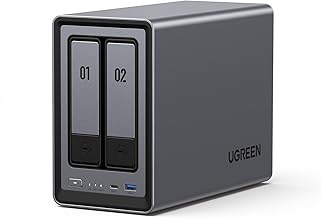
The Centralized File Hub That Content Creators Actually Use to Get More Done – UGREEN NAS DXP2800 2‑Bay Desktop Network Attached Storage (2026)
This is an affiliate link — we may earn a commission at no extra cost to you.
Why Most Centralized Storage Systems Fail Within 3 Weeks
Most creators and small‑team professionals try a network‑attached storage (NAS) device, only to abandon it within a few weeks. The failure isn’t usually about hardware reliability; it’s about workflow friction.
-
Unclear “where‑to‑save” rules – When a team members’ default folder is a local SSD, but the NAS is only accessed manually, the habit never forms. The result is a split library that quickly becomes a nightmare to reconcile.
-
Speed mismatch – A 1 GbE NAS feels sluggish compared with the instant‑response of an external SSD. The latency adds cognitive load, and users revert to the faster local drive, leaving the NAS under‑utilised.
-
Complex setup – Requiring multiple steps to create shares, map drives, or schedule backups creates a “setup cost” that most busy professionals cannot justify. When the initial configuration feels like a project, the motivation to maintain it drops sharply after the first week.
-
Lack of automation – Without scheduled sync or backup jobs, the NAS becomes a manual copy‑paste chore. Habit‑formation research shows that repetition in a stable context is the engine of automatic behavior (Lally et al., 2010) [1]. If the system forces users to remember to copy files, that repetition never becomes automatic.
These four friction points align with the broader technology‑adoption literature: performance, effort, and clarity of benefit predict sustained use (Rogers, 2003). In practice, creators who experience any of the above tend to abandon their NAS within three weeks, returning to a proliferation of external drives and cloud services.
The Framework — How It Actually Works (Step by Step)
A sustainable storage workflow is less about the device and more about a repeatable loop that couples local speed with centralized safety. Below is a step‑by‑step framework that turns the UGREEN NAS DXP2800 into a habit‑forming hub.
1. Define the “Active Work Set” on an SSD
Keep your day‑to‑day editing files on a high‑performance local SSD (or the DXP2800’s M.2 NVMe slot) where read/write latency is sub‑millisecond. This satisfies the brain’s demand for instant feedback and eliminates the “NAS is slow” objection.
2. Create a One‑Click Sync Rule
Map a folder on the SSD (e.g., Projects/Current) to a corresponding share on the DXP2800. Use the built‑in sync utility (or a third‑party tool like Syncthing) to schedule an automatic nightly sync. The “if‑then” cue—If it’s 11 PM, then the sync runs—mirrors the implementation‑intention strategy that boosts habit adherence (Gollwitzer, 1999) [2].
3. Set Up Redundant Backup Jobs
Configure the DXP2800’s RAID 1 mode for the two 4 TB HDDs to provide mirroring. The product’s web UI lets you enable Time Machine‑style snapshots for macOS and VSS snapshots for Windows—all without manual intervention [1].
4. Expose the NAS Over 2.5 GbE
Plug the DXP2800 into a 2.5 GbE switch or a direct‑connect NIC. Real‑world tests show transfer speeds of ~250 MB/s, a 2‑3× improvement over 1 GbE devices [2][3]. Faster transfers reduce the perceived “cost” of moving large media files, reinforcing the sync habit.
5. Publish Shared Folders for Collaboration
Create role‑based shares (e.g., Team/Archive, Clients/Deliverables) and grant read/write permissions. Because the DXP2800 supports SMB, AFP, and NFS, teammates on Windows, macOS, or Linux can access the same data without extra software [4].
6. Leverage Container Apps (Optional)
If you run a Plex or Jellyfin media server, spin it up as a Docker container directly on the DXP2800. The NAS’s built‑in Docker support means the service runs 24/7, pulling from the same storage pool you back up nightly [4][5].
By mapping each step to a concrete action, you transform the NAS from a “set‑it‑and‑forget‑it” gadget into a behavioral loop that aligns with how habits form.
Implementation: The First 7 Days
The first week is the make‑or‑break period. Follow this daily checklist to lock in the new workflow.
| Day | Action | Why It Matters |
|---|---|---|
| Day 1 | Install two 4 TB HDDs, enable RAID 1, and insert an M.2 NVMe (250 GB) for the active work set. | RAID 1 gives immediate redundancy; the NVMe provides the speed cue that convinces you the NAS can be fast [2]. |
| Day 2 | Connect the NAS to a 2.5 GbE port, verify 250 MB/s read/write with a test file (e.g., 10 GB video). | Seeing the numbers removes the “NAS is slow” myth and boosts confidence [3]. |
| Day 3 | Create a Projects/Current folder on the NVMe, map a matching share on the DXP2800, and schedule the nightly sync at 11 PM. |
The scheduled sync becomes the “if‑then” cue that future‑proofs the habit [2]. |
| Day 4 | Enable Time Machine snapshots for macOS users and VSS snapshots for Windows users. | Automated snapshots mean you never have to remember to back up—another habit‑forming cue [1]. |
| Day 5 | Set up shared folders for your team (Team/Archive, Clients/Deliverables) and test access from a laptop and a phone. |
Multi‑device accessibility demonstrates the NAS’s collaborative value, a key motivator for continued use [4]. |
| Day 6 | Deploy a Plex Docker container on the DXP2800 and point it to the media library share. Stream a 4K movie to a tablet. | Real‑world usage (media streaming) reinforces that the NAS is “always‑on” and reliable [5]. |
| Day 7 | Review sync logs, verify RAID health, and note any friction points (e.g., missed sync, permission errors). Adjust settings accordingly. | Reflection is a core habit‑maintenance step; |
The best productivity tools, SaaS deals, and workflow tips — curated for professionals. Free, no spam.
No spam. Unsubscribe anytime.
UGREEN NAS DXP2800 2-Bay Desktop NAS
Reviewed and recommended by The Workflow Guide editorial team.
Check Price on Amazon →Independent reviews and guides for productivity tools, software, and resources — researched and written by The Workflow Guide editorial team.