Anker 20,000mAh Portable Charger: Full Rundown (2026)
This is an affiliate link — we may earn a commission at no extra cost to you.
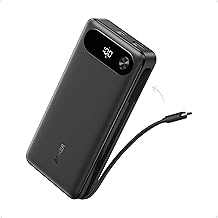
This is Anker's 20,000mAh power bank with a built-in USB-C cable (model A1383). It shares up to 87W across three devices, with up to 65W from a single output — enough to charge a laptop, not just a phone [1][2]. Anker's own store lists it at $69.99 [2]. This page is based on Anker's published specifications; we didn't find an independent lab review of this model, and we don't test power banks in-house.
Quick verdict
For hybrid and travelling workers, the appeal is simple: a laptop-capable power bank that you can't leave the cable behind for, because the cable is built in [1]. With 65W from a single output, Anker says it charges a 14" MacBook Pro to 50% in under 40 minutes [1]. Treat the speed figures as Anker's claims, and remember that a 20,000mAh bank gives a laptop roughly one partial-to-full top-up rather than a full day.
Full specs
| Spec | Anker Power Bank (20K, 87W, Built-In USB-C Cable) |
|---|---|
| Model | A1383 [1] |
| List price | $69.99 on Anker.com [2] |
| Capacity | 20,000mAh [1] |
| Total output | 87W shared across three devices [1] |
| Single-output max | 65W [1] |
| Outputs | Built-in USB-C cable plus two ports — three outputs in total [1] |
| Recharge | Full recharge in about 1.5 hours with a 65W charger [1] |
| Cable durability | Built-in cable rated for 10,000+ bends [1] |
| Size / weight | 6.2 × 2.9 × 1.0 in, 15.5 oz [1] |
| Air travel | Approved for airline travel per Anker [1] |
| Warranty | 18 months [1] |
What stands out
- Laptop-class output. Up to 65W from one output [1] covers most 13–14" laptops. Anker quotes a 14" MacBook Pro reaching 50% in under 40 minutes [1].
- Built-in cable. The integrated USB-C cable means one less thing to pack; Anker rates it for 10,000+ bends [1]. It also gets an iPhone 15 Pro to 58% or a MacBook Air to 52% in 30 minutes, per Anker [1].
- Three devices at once. 87W total across the built-in cable and the other two outputs [1] — laptop, phone, and earbuds together.
- Fast to refill. About 1.5 hours to recharge with a 65W charger [1], so an overnight or lunch-break top-up is realistic.
What to know before buying
- Output is shared. 87W is the total across all three outputs; only one device gets the full 65W [1]. Charging three things at once means each charges slower.
- Capacity is finite. 20,000mAh is a lot for phones but modest for laptops — expect roughly one laptop top-up, depending on the laptop's battery size.
- It's not light. 15.5 oz and 6.2 inches long [1] — a bag item, not a pocket one.
- High-wattage laptops. Power-hungry 16" laptops that need 100W+ will charge slowly or only hold their level under load at 65W.
- Speed figures are Anker's. The charge-time numbers come from Anker's listing, not independent testing [1].
Who it's for
- Good fit: people who work from cafés, trains, and airports with a USB-C laptop; anyone who forgets cables.
- Maybe: owners of 16" performance laptops — 65W will slow battery drain rather than fully charge under load.
- Skip it: if you only charge a phone — a smaller, lighter bank will do.
FAQ
Can the Anker 20,000mAh power bank charge a laptop? Yes — up to 65W from a single output, and Anker says it charges a 14" MacBook Pro to 50% in under 40 minutes [1].
Is it allowed on planes? Anker says it is approved for airline travel [1]; check your airline's rules.
How long does it take to recharge? About 1.5 hours with a 65W charger, per Anker [1].
How many devices can it charge at once? Three, sharing 87W total [1].
Bottom line
Anker's 87W, 20,000mAh bank with a built-in cable is a practical laptop backup for working on the move: 65W from one output, three devices at once, and no cable to forget. Just keep expectations in line with its capacity — it's a top-up, not a second battery for the whole day.
Check the current price on the Anker 20,000mAh Power Bank →
See also
Sources
- 20,000mAh, 87W shared across three devices with up to 65W single output, 14" MacBook Pro to 50% in under 40 minutes, built-in cable charging times, 1.5-hour recharge with a 65W charger, 10,000+ bend cable, airline approval, 6.2 × 2.9 × 1.0 in / 15.5 oz, 18-month warranty, model A1383 — Anker's Amazon listing for the Anker Power Bank (20K, 87W, Built-In USB-C Cable)
- $69.99 list price, 87W, 20,000mAh, built-in USB-C — Anker, Power Bank (20K, 87W, Built-In USB-C Cable) product page
The Workflow Guide publishes independent research on tech tools and gear. We do not test power banks in-house; this page is based on Anker's published specifications.
Connection, audio, light, camera, desk and power, in the order that matters. Free 2-page PDF, no spam.
No spam. Unsubscribe anytime.
Anker Power Bank 20000mAh
Our pick, based on published specs and owner reviews — not hands-on testing.
Check Price on Amazon →Founder of The Workflow Guide — an IT professional who researches home-office gear and productivity software from specs, documentation and published reviews. Full bio →