Best Thunderbolt 5 Dock for a Home Office (2026)
Thunderbolt 5 docks are the newest wave of docking stations, built around the higher bandwidth of the Thunderbolt 5 standard -- useful if you're running multiple high-resolution monitors, fast external storage, or both from a single cable. This guide compares the Thunderbolt 5 docks worth considering in 2026, based on published specifications, professional review testing, and recurring themes in verified owner reviews. We don't test docks in-house yet, so where an assessment comes from a reviewer we say so.
How we compared them
We weighted port count and layout, display support (how many monitors at what resolution), power delivery to your laptop, and any feature that meaningfully separates one dock from the rest of the field -- built-in storage, security features, or Mac-specific tuning. Almost any Thunderbolt 5 dock will charge your laptop and drive an external monitor; the differences that matter show up in the edge cases.
The specs that matter (and the ones that don't)
- Matters: how many displays it drives and at what resolution/refresh, power delivery wattage (100W+ covers most laptops), and Ethernet speed if you rely on wired internet.
- Matters less: raw Thunderbolt 5 bandwidth headroom for most people -- very few home-office workflows saturate Thunderbolt 4, let alone Thunderbolt 5. It matters if you move large video files or run multiple 4K+ displays; it's marketing noise otherwise.
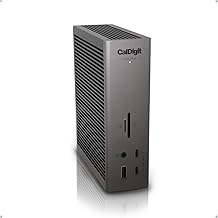
Best overall: CalDigit TS5 Plus
CalDigit's TS-series docks have the longest track record in this category, and reviewers consistently rate the TS5 Plus as the most complete option -- a large port selection, reliable multi-display support, and enough power delivery to charge demanding laptops. It's the safe default pick if you don't have a specific reason to choose something else. It packs 20 total ports — three of them Thunderbolt 5 — plus 10 Gigabit Ethernet and up to 140W of power delivery to the host, which is why it's also the largest and priciest dock in this roundup.
→ Full CalDigit TS5 Plus breakdown Check CalDigit TS5 Plus price →
Best value: OWC 11-Port Thunderbolt Dock
OWC's dock undercuts CalDigit on price while still covering the core Thunderbolt 5 feature set -- multiple downstream ports, solid display support, and laptop charging. Reviewers note it doesn't match the TS5 Plus's port count or brand track record, but for a single-monitor home-office setup it's a lot of dock for less money.
Check the current OWC 11-Port Thunderbolt Dock price →
Best for IT-managed setups: Kensington SD5000T5
Kensington's dock is aimed squarely at business and IT-managed environments: a Kensington lock slot for physical security, and DockWorks fleet-management software that lets IT push firmware and settings across many docks at once. If you're outfitting more than one desk, that manageability is the differentiator; for a single personal setup it's an unnecessary feature to pay for.
Check the current Kensington SD5000T5 price →
Best with built-in storage: Sonnet Echo 21 SuperDock
The Echo 21 is the only dock here with a built-in M.2 NVMe SSD slot (you supply the drive, up to 8TB), turning the dock itself into fast external storage instead of needing a separate enclosure. It carries the same core Thunderbolt 5 port set as the others, plus 10Gb Ethernet. Worth the extra look if you're already planning to buy a separate external SSD -- this folds that purchase into the dock.
Check the current Sonnet Echo 21 SuperDock price →
Common mistakes to avoid
- Buying Thunderbolt 5 bandwidth you won't use. If your workflow is one monitor plus web browsing, a Thunderbolt 4 dock does the same job for less.
- Ignoring your laptop's actual charging needs. Check your laptop's power draw against the dock's power-delivery wattage before assuming "it charges laptops" covers yours.
- Overlooking Ethernet speed if you work over a wired connection. Not every dock in this category includes 10Gb Ethernet -- check the spec if that matters to you.
Quick recommendation
| Your situation | Buy |
|---|---|
| Best all-round dock, no specific need | CalDigit TS5 Plus |
| Want to spend less on a single-monitor setup | OWC 11-Port Thunderbolt Dock |
| Outfitting multiple desks under IT management | Kensington SD5000T5 |
| Want built-in fast storage instead of a separate SSD | Sonnet Echo 21 SuperDock |
Browse the full range in the Workflow Guide dock store.
FAQ
Do I actually need Thunderbolt 5 bandwidth? Only if you move large video files or run multiple 4K+ displays. Very few home-office workflows saturate Thunderbolt 4, let alone Thunderbolt 5 — for a lighter setup, the extra bandwidth is mostly marketing headroom.
Which dock should I buy for a single-monitor home office? The OWC 11-Port Thunderbolt Dock. It undercuts the CalDigit TS5 Plus on price while still covering the core Thunderbolt 5 feature set — multiple downstream ports, solid display support, and laptop charging — even though it doesn't match the TS5 Plus's port count or track record.
Which dock makes sense if I'm outfitting more than one desk? The Kensington SD5000T5. It's built for IT-managed environments, with a Kensington lock slot for physical security and DockWorks fleet-management software to push firmware and settings across many docks at once — a feature that's wasted on a single personal setup.
The Workflow Guide publishes independent research and comparisons for remote workers, creators, and small teams. We do not test docks in-house; this guide is based on manufacturer specifications, professional reviews, and verified owner feedback, and is reviewed by our editor before publishing. Some links are affiliate links -- we may earn a commission if you buy through them, at no extra cost to you. See our full disclosure.
Connection, audio, light, camera, desk and power, in the order that matters. Free 2-page PDF, no spam.
No spam. Unsubscribe anytime.
Top picks from this guide
Based on published specs and owner reviews — not hands-on testing.
- CalDigit TS5 PlusCheck price →
- OWC 11-Port Thunderbolt Dock
- Kensington SD5000T5
- Sonnet Echo 21 SuperDock
Founder of The Workflow Guide — an IT professional who researches home-office gear and productivity software from specs, documentation and published reviews. Full bio →