CalDigit TS5 Plus Thunderbolt 5 Dock: Specs, Reviews & Who It's For (2026)
This is an affiliate link — we may earn a commission at no extra cost to you.
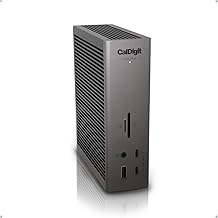
The TS5 Plus is CalDigit's flagship Thunderbolt 5 dock: 20 ports, 10 Gigabit Ethernet, and 140W of laptop charging from a single cable. It went on sale in the US in late April 2025 at $499.99 [1]. This page is based on CalDigit's published specifications and independent professional reviews; we don't test docks in-house.
Quick verdict
If you run a Mac or a recent Thunderbolt 4/5 Windows laptop at a desk with several displays, fast external storage, and a wired network, the TS5 Plus is the most complete Thunderbolt 5 dock you can buy right now — 9to5Mac called it "the best Thunderbolt dock that you can currently purchase" [3]. If you don't need 10GbE or two downstream Thunderbolt 5 ports, you're paying for headroom you won't use.
Full specs
| Spec | CalDigit TS5 Plus |
|---|---|
| Launch price | $499.99 (US), late April 2025 [1] |
| Host connection | Thunderbolt 5, up to 120Gb/s, 140W charging to laptop [2] |
| Downstream Thunderbolt 5 | 2× (80Gb/s, 36W each) [2] |
| USB-C (10Gb/s) | 5× — one front port at 36W, the rest at 7.5W [2] |
| USB-A (10Gb/s) | 5× at 7.5W [2] |
| Display output | 1× DisplayPort 2.1 (plus displays over the Thunderbolt 5 ports) [2] |
| Networking | 10 Gigabit Ethernet [2] |
| Card readers | SD 4.0 UHS-II and microSD 4.0 UHS-II [2] |
| Audio | 2× 3.5mm out, 1× 3.5mm in [2] |
| Power supply | 330W external brick [2] |
| Dimensions | 155.0 × 47.0 × 127.9 mm (6.10 × 1.85 × 5.03 in) [2] |
| Weight | 0.90 kg (1.98 lb) [2] |
| Included cable | 1.0m braided Thunderbolt 5 [2] |
| Warranty | 2 years [2] |
Compatibility — check this before you buy
This is the part most listings gloss over. Per CalDigit's compatibility notes [2]:
- Mac: works with Thunderbolt 3, 4, and 5 Macs on macOS 15 or later. Display count depends on the chip — base M-series chips drive a single external display, while Pro/Max chips drive two or more.
- Windows: requires Windows 11, a Thunderbolt 4 or newer port, and an Intel 12th-gen or newer system. Thunderbolt 5 PCs get up to three displays; Thunderbolt 4 PCs get two.
- Not compatible: plain USB-C laptops and Thunderbolt 3 Windows PCs.
- USB4 PCs: supported only if the host supports PCIe tunneling.
If your laptop is a USB-C-only model, a USB-C hub or dock is the right category instead — see our USB-C hub and docking station guide.
What reviewers highlight
- Bandwidth for fast storage. Thunderbolt 5 doubles PCIe bandwidth over Thunderbolt 4 (32Gb/s to 64Gb/s), which 9to5Mac notes allows external drives up to about 6,000MB/s [3].
- Charging that holds up under load. The reviewer reports the 140W host charging "doesn't throttle down when other devices are connected" [3].
- 10GbE. The jump from 2.5GbE on earlier CalDigit docks to 10GbE is called "one of the most noteworthy upgrades" [3] — it matters if you work off a NAS or a fast office network.
- More USB bandwidth. CalDigit says the Plus uses two 10Gb/s USB controllers rather than one, so multiple USB devices don't share a single controller [1].
What to know before buying
- It's big. 9to5Mac describes it as "significantly larger than the TS3 Plus, and still quite a bit larger than the TS4," and the 330W power brick "has gotten much bigger" [3]. Plan for the brick under your desk.
- No HDMI. There's one DisplayPort 2.1 output; additional monitors go through the Thunderbolt 5 ports, which uses up the two downstream Thunderbolt ports if your monitors are USB-C [3].
- Price. At $499.99 it is, in the reviewer's words, "far outside of impulse-buy territory" [3].
TS5 vs TS5 Plus
CalDigit sells a cheaper TS5 alongside the Plus. The TS5 has 15 ports and the same 140W charging, but drops the 10GbE port and the dual USB controllers [1]. If you're on Wi-Fi or 2.5GbE and don't plug in many USB devices at once, the TS5 is the sensible saving. For a head-to-head against the main rival, see CalDigit TS5 Plus vs OWC Thunderbolt 5 Dock, and for the whole category, our best Thunderbolt 5 dock guide.
FAQ
When did the CalDigit TS5 Plus come out? It went on sale in the US in late April 2025 [1].
Does the TS5 Plus work with a base M-series MacBook Air? Yes, but base M-series chips support only one external display through it [2].
Can it charge a 16-inch MacBook Pro? It delivers up to 140W to the host [2]. Check the wattage of the charger that came with your laptop — if it's 140W or less, the dock can match it.
Does it work with Windows laptops? Yes, if the laptop has Thunderbolt 4 or 5, runs Windows 11, and is Intel 12th-gen or newer. Thunderbolt 3 Windows PCs aren't supported [2].
Bottom line
For a desk that needs every port, fast networking, and full-speed laptop charging from one cable, the TS5 Plus is the reference Thunderbolt 5 dock. Check your laptop against the compatibility list first, and leave room for the power brick.
Check the current price on the CalDigit TS5 Plus →
See also
- CalDigit TS5 Plus vs OWC Thunderbolt 5 Dock — full comparison
- Best Thunderbolt 5 docks for a home office (2026)
- Best USB-C hubs and docking stations (2026)
Sources
- TS5 Plus US availability (late April 2025), $499.99 price, dual USB controllers, TS5 vs TS5 Plus differences — CalDigit, Introducing the CalDigit TS5 & TS5 Plus
- Port list, power delivery, power supply, dimensions, weight, included cable, display support, compatibility, warranty — CalDigit, TS5 Plus product page
- Bandwidth, charging under load, 10GbE, size, power brick, no HDMI, price, verdict — 9to5Mac, CalDigit TS5 Plus review
The Workflow Guide publishes independent research on tech tools and gear. We do not test docks in-house; this page is based on manufacturer specifications and published professional reviews.
Connection, audio, light, camera, desk and power, in the order that matters. Free 2-page PDF, no spam.
No spam. Unsubscribe anytime.
CalDigit TS5 Plus Thunderbolt 5 Dock
Our pick, based on published specs and owner reviews — not hands-on testing.
Check Price on Amazon →Founder of The Workflow Guide — an IT professional who researches home-office gear and productivity software from specs, documentation and published reviews. Full bio →