CalDigit TS5 Plus vs OWC Thunderbolt 5 Dock: Best TB5 Dock in 2026?
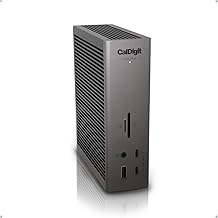
Thunderbolt 5 docks are the new standard for creators and power users who plug a laptop into a full desk setup — more bandwidth, more downstream power, and enough ports to stop juggling adapters. The CalDigit TS5 Plus and the OWC Thunderbolt 5 Dock are two of the most-discussed options in this category, with the Kensington SD5000T5 as a solid third option if you want fewer ports at a lower price. This comparison is based on manufacturer specifications and published spec-sheet data; we don't test docks in-house.
Some links below are affiliate links — we may earn a commission if you buy through them, at no extra cost to you. See our full disclosure.
The quick answer
Get the CalDigit TS5 Plus if you want the most ports and the most total power — 20 ports including three Thunderbolt 5 connections, 10GbE, and up to 140W to the host, built for a desk that needs everything in one dock. Get the OWC Thunderbolt 5 Dock if you want a more compact dock with the essentials — 11 ports including four Thunderbolt 5 connections and the same 140W host power delivery, at a meaningfully lower price. If you want the cheapest real Thunderbolt 5 entry point, the Kensington SD5000T5 covers the core ports (including 140W charging) for less than either.
Check current price on the CalDigit TS5 Plus →
Comparison at a glance
| Feature | CalDigit TS5 Plus | OWC Thunderbolt 5 Dock (11-port) |
|---|---|---|
| Price | Check current price | Check current price |
| Thunderbolt version | Thunderbolt 5 (80/120Gb/s) | Thunderbolt 5 (80/120Gb/s) |
| Total ports | 20 | 11 |
| Downstream TB/USB ports | 3× Thunderbolt 5, 5× USB-C 10Gb/s, 5× USB-A 10Gb/s | 4× Thunderbolt 5 total (incl. host), 2× USB-A 10Gb/s, 1× USB-A 5Gb/s |
| Max displays (resolution) | Up to 120Gb/s display bandwidth | Up to 3× 8K/60Hz, or 2× 8K/120Hz |
| Power to host | Up to 140W | Up to 140W |
| Downstream charging | Up to 36W on TB5/USB-C ports | 15W per Thunderbolt 5 port, 7.5W per USB-A port |
| Ethernet | 10GbE | 2.5GbE |
| SD card slots | None (DisplayPort 2.1 instead) | SD + microSD |
| Mac/Windows support | Both | Both |
| Best for | Maximum ports and 10GbE on one desk | Compact desk that still wants full TB5 speed |
CalDigit TS5 Plus: overview
The TS5 Plus is built for people who want everything on one dock and don't want to compromise on port count. Twenty ports total — three of them Thunderbolt 5 — plus 10 Gigabit Ethernet and a DisplayPort 2.1 output make it the more complete station of the two, and its 140W host power delivery with up to 36W on downstream ports means it can charge power-hungry accessories at the same time as your laptop. The trade-off is size and price: it's the larger, pricier dock of the group.
OWC Thunderbolt 5 Dock: overview
OWC's current 11-port Thunderbolt 5 Dock replaces their older Thunderbolt 3-era "Pro Dock" — worth flagging, since some older buying guides still reference that discontinued model when discussing OWC's dock lineup. This is the real Thunderbolt 5 competitor: four Thunderbolt 5 ports (one host, three downstream), the same 140W host power delivery as the CalDigit, triple 8K display support, and a notably smaller footprint. It trades total port count and Ethernet speed (2.5GbE vs CalDigit's 10GbE) for a lower price and a more compact desk presence.
Thunderbolt 5 vs Thunderbolt 4
Both docks run full Thunderbolt 5, meaning up to 80Gb/s bidirectional bandwidth (120Gb/s in bandwidth-boost mode for displays) — roughly double what Thunderbolt 4 offers. That matters most if you're driving multiple high-resolution displays, working with external Thunderbolt 5 storage, or want headroom as more TB5 accessories reach the market. If your laptop is Thunderbolt 4 or USB4 rather than TB5, both docks still work, just capped at your laptop's own port speed.
Ports & display outputs
This is where the two diverge most: the CalDigit's 20 ports and 10GbE Ethernet make it the choice if you're connecting a lot of peripherals and need the fastest possible wired network. The OWC's 11 ports are more curated — still three downstream Thunderbolt 5 ports plus USB-A and card readers — and its display support is specifically strong, rated for up to three 8K displays at 60Hz. If your setup is "one dock, everything plugged in, all the time," CalDigit's port count wins. If you want a full-speed TB5 dock without the desk footprint of a 20-port unit, OWC's smaller dock covers the essentials.
Power delivery & charging
Both docks deliver up to 140W to the host laptop — enough to fast-charge even a 16-inch MacBook Pro. The difference shows up on the downstream ports: CalDigit pushes up to 36W to charge accessories plugged into its Thunderbolt 5 or USB-C ports, while OWC's downstream Thunderbolt 5 ports each offer 15W (USB-A ports offer 7.5-10W). If you're charging power-hungry downstream devices — not just data peripherals — the CalDigit has more headroom.
Mac vs Windows compatibility
Both docks are built for and tested on Mac and Windows Thunderbolt/USB4 systems, and neither is Mac-exclusive despite CalDigit and OWC both having strong reputations in the Mac accessory market specifically. Driver quirks are more likely to come from your laptop's own Thunderbolt controller and OS version than from either dock — check your specific laptop model against each manufacturer's compatibility list if you're on an older Thunderbolt 3 machine.
Price & warranty
The price gap is real and consistent: the CalDigit TS5 Plus costs noticeably more than the OWC Thunderbolt 5 Dock. If you don't need 10GbE or the extra port count, the OWC gets you full Thunderbolt 5 speed and 140W charging for meaningfully less. The Kensington SD5000T5 undercuts both with a more basic port set (still 140W host charging and multiple TB5 ports), making it worth a look if price is the deciding factor and you don't need CalDigit's port density or OWC's display flexibility.
Check the current CalDigit TS5 Plus price → · Check the current OWC Thunderbolt 5 Dock price →
Pros and cons
CalDigit TS5 Plus - ✅ 20 ports — the most complete dock of the group - ✅ 10GbE Ethernet, DisplayPort 2.1 - ✅ Up to 36W downstream charging - ❌ Highest price of the three - ❌ Larger desk footprint
OWC Thunderbolt 5 Dock - ✅ Full Thunderbolt 5 speed at a lower price - ✅ Compact, up to 3× 8K displays - ✅ Same 140W host charging as CalDigit - ❌ Fewer ports, only 2.5GbE Ethernet - ❌ Lower downstream charging per port (15W)
Verdict — choose CalDigit if / choose OWC if
Choose the CalDigit TS5 Plus if you want maximum ports, 10GbE networking, and the most downstream charging headroom on one desk, and the price and size don't bother you.
Choose the OWC Thunderbolt 5 Dock if you want full Thunderbolt 5 bandwidth and strong multi-display support in a smaller, cheaper dock, and you don't need 10GbE or a large port count.
See also
FAQ
Is Thunderbolt 5 backward compatible? Yes. Both docks work with Thunderbolt 4 and USB4 laptops, though you'll be capped at your laptop's own port speed rather than the dock's full Thunderbolt 5 bandwidth.
Which dock charges a laptop? Both deliver up to 140W to the host laptop — enough for a 16-inch MacBook Pro or similarly power-hungry Windows laptop at full charging speed.
Best dock for Mac Studio? Either works well with Mac Studio's Thunderbolt ports. If you need 10GbE for fast networked storage or NAS access, the CalDigit's built-in 10 Gigabit Ethernet is the more direct fit; if 2.5GbE is enough, the OWC's smaller footprint and lower price make sense on a desk that's already tight on space.
The Workflow Guide publishes independent research and comparisons for remote workers, creators, and small teams. We do not test docks in-house; this guide is based on manufacturer specifications and published spec-sheet data, and is reviewed by our editor before publishing.
Connection, audio, light, camera, desk and power, in the order that matters. Free 2-page PDF, no spam.
No spam. Unsubscribe anytime.
Products compared
Based on published specs and owner reviews — not hands-on testing.
- CalDigit TS5 PlusCheck price →
- OWC Thunderbolt 5 Dock
Founder of The Workflow Guide — an IT professional who researches home-office gear and productivity software from specs, documentation and published reviews. Full bio →