LG UltraFine 27US500-W vs Dell P2725QE: Best 27" 4K Monitor in 2026?
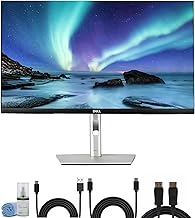
If you're upgrading to a 27" 4K screen for spreadsheets, code, or design work, these two show up in almost every shortlist search — but they're not really competing for the same buyer. The LG UltraFine 27US500-W is a budget-friendly 4K panel with basic HDMI/DisplayPort connectivity. The Dell P2725QE is a business-class monitor built around a USB-C docking hub. This comparison is based on manufacturer specifications and published spec-sheet data; we don't test monitors in-house.
Some links below are affiliate links — we may earn a commission if you buy through them, at no extra cost to you. See our full disclosure.
The quick answer
Get the Dell P2725QE if you connect a laptop to your monitor — its USB-C hub delivers video, data, Ethernet, and up to 90W of power over a single cable, plus a fully adjustable stand and a 100Hz refresh rate. Get the LG UltraFine 27US500-W if you just need an affordable second or third 4K screen and already have a dock, docking laptop, or desktop tower — it has no USB-C at all, only HDMI and DisplayPort, and a tilt-only stand, but it typically costs meaningfully less.
Check current price on the Dell P2725QE →
Comparison at a glance
| Feature | LG UltraFine 27US500-W | Dell P2725QE |
|---|---|---|
| Price | Budget tier | Mid tier |
| Panel | 27" IPS, matte anti-glare | 27" IPS, anti-glare |
| Resolution | 3840×2160 (4K UHD) | 3840×2160 (4K UHD) |
| Refresh rate | 60Hz | 100Hz |
| USB-C PD (W) | None — no USB-C port | 90W (single-cable laptop charging) |
| Hub ports | None | USB-C, USB-A, RJ45 Ethernet, DisplayPort out |
| Stand adjustability | Tilt only | Height, tilt, swivel, pivot |
| Display outputs | 2× HDMI, 1× DisplayPort | HDMI, DisplayPort, USB-C (video) |
| Color (sRGB/DCI-P3) | 90% DCI-P3, HDR10 | 99% sRGB, 350 nits |
| Warranty | 1 year (standard LG US coverage) | 3-year limited hardware warranty |
| Best for | Budget-conscious multi-monitor setups | Laptop users who want single-cable docking |
LG UltraFine 27US500-W: overview
The 27US500-W is LG's entry-level 4K UltraFine — a straightforward IPS panel aimed at anyone who wants sharp 4K text and images without paying for extras. It covers 90% of the DCI-P3 color space and supports HDR10, which is respectable for the price bracket. The trade-off is connectivity and ergonomics: it's HDMI/DisplayPort only, with a stand that only tilts, so it works best as an additional screen next to a laptop or desktop that's already docked some other way.
Dell P2725QE: overview
The P2725QE (part of Dell's "Pro Plus" business line) is built around a USB-C hub — the headline feature is single-cable connectivity that carries video, data, Ethernet, and up to 90W of charging power to a laptop. It backs that up with a fully adjustable stand (height, tilt, swivel, pivot), a 100Hz refresh rate that's unusually fast for a 4K business monitor, and a 3-year warranty. It costs more, but it's positioned to replace both your monitor and your dock.
Panel, resolution & color
Both are 27" IPS panels at 3840×2160 (4K UHD) — pixel density and sharpness are essentially identical. Where they diverge: the LG covers 90% DCI-P3 and supports HDR10, which suits general use and casual media; Dell's spec sheet leads with 99% sRGB coverage at 350 nits, which is the more relevant number for office and document work rather than wide-gamut media. Neither is marketed as a color-critical panel for photo or video grading. The Dell's 100Hz refresh rate (vs. the LG's standard 60Hz) makes cursor movement and window dragging noticeably smoother, even though neither is a gaming monitor.
USB-C hub & power delivery — only one has it
This is the decisive spec, and it's worth stating plainly: the LG UltraFine 27US500-W does not have a USB-C port. Its only inputs are two HDMI ports and one DisplayPort. If you were expecting a hub or laptop charging from the LG based on the "UltraFine" name, it isn't there on this specific model.
The Dell P2725QE, by contrast, is built around its USB-C hub: a single cable to your laptop carries video, USB data, wired Ethernet, and up to 90W of power delivery — enough to charge most laptops without a separate charger. If reducing cable clutter or eliminating a dock is any part of why you're buying a monitor, the Dell is the only one of these two that does it.
Stand & ergonomics
The LG's stand tilts (roughly -5° to +20°) and nothing else — no height adjustment, no swivel, no pivot. For extended desk use, that's a real limitation; you'll likely need a separate VESA arm to get the screen to eye level. The Dell's stand is fully adjustable: about 150mm of height travel, -5° to 21° tilt, ±45° swivel, and ±90° pivot to portrait orientation. For anyone spending a full workday at the screen, the Dell's stand is the more ergonomically sound choice out of the box.
Ports & connectivity
The LG offers 2× HDMI and 1× DisplayPort — enough for a basic single-PC setup, plus a 3.5mm headphone jack. The Dell adds a downstream USB-C port, USB-A ports, a built-in RJ45 Ethernet jack, and a DisplayPort output for daisy-chaining a second monitor, on top of its HDMI and USB-C video inputs. If you plan to plug in USB accessories, a wired network connection, or a second display directly into the monitor, the Dell's hub covers that; the LG has none of it.
Price, warranty & support
The LG is the clear budget option; the Dell sits a full price tier higher. Dell backs the P2725QE with a 3-year limited hardware warranty and advanced-exchange service, well ahead of LG's standard 1-year US coverage. If the monitor is a business tool you rely on daily, the longer Dell warranty and Dell's support infrastructure are worth factoring into the price gap — not just the sticker price.
Check the current Dell P2725QE price → · Check the current LG UltraFine 27US500-W price →
Pros and cons
LG UltraFine 27US500-W - ✅ Meaningfully cheaper than the Dell - ✅ 90% DCI-P3 + HDR10 for a budget panel - ✅ Simple HDMI/DisplayPort setup - ❌ No USB-C — no hub, no laptop charging - ❌ Tilt-only stand, no height adjustment - ❌ Standard 1-year warranty
Dell P2725QE - ✅ USB-C hub — video, data, Ethernet, 90W charging over one cable - ✅ Fully adjustable stand (height/tilt/swivel/pivot) - ✅ 100Hz refresh rate, 3-year warranty - ❌ Costs significantly more - ❌ 99% sRGB spec, not marketed for wide-gamut color work
Verdict — choose LG if / choose Dell if
Choose the LG UltraFine 27US500-W if you want an affordable 4K screen for a desktop, or as an extra display next to a laptop that's already docked another way, and you don't need USB-C or ergonomic height adjustment.
Choose the Dell P2725QE if you connect a laptop directly to your monitor and want to cut down to one cable for video, data, and charging, or you spend long days at the screen and want a stand that actually adjusts to you.
See also
FAQ
Which is better for Mac? Both work with Mac over their respective video inputs. The Dell's USB-C port is the more relevant advantage for MacBook users specifically, since a single USB-C cable can drive the display, pass data, and deliver up to 90W of charging — something the HDMI/DisplayPort-only LG can't do. Confirm your MacBook's charging wattage needs against the Dell's 90W limit before relying on it as your sole charger.
Does the LG charge a laptop over USB-C? No. The LG UltraFine 27US500-W has no USB-C port at all — it connects only via HDMI or DisplayPort, so it can't charge or dock a laptop.
Which has better ergonomics? The Dell, clearly. Its stand adjusts for height, tilt, swivel, and pivot; the LG's stand only tilts, with no height adjustment built in.
The Workflow Guide publishes independent research and comparisons for remote workers, creators, and small teams. We do not test monitors in-house; this guide is based on manufacturer specifications and published spec-sheet data, and is reviewed by our editor before publishing.
Connection, audio, light, camera, desk and power, in the order that matters. Free 2-page PDF, no spam.
No spam. Unsubscribe anytime.
Products compared
Based on published specs and owner reviews — not hands-on testing.
- LG UltraFine 27US500-WCheck price →
- Dell P2725QECheck price →
Founder of The Workflow Guide — an IT professional who researches home-office gear and productivity software from specs, documentation and published reviews. Full bio →