Logitech MX Master 3S vs Razer Pro Click Mini: Best Productivity Mouse in 2026?
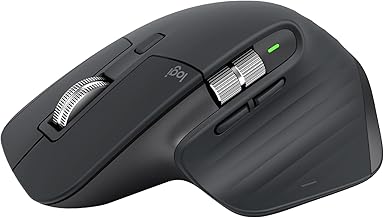
Both of these show up constantly in "best mouse for work" recommendations, but they're built around different trade-offs — one prioritizes scroll speed and precision, the other prioritizes portability and battery that never needs a cable. This comparison is based on manufacturer specifications and published spec-sheet data; we don't test peripherals in-house.
Some links below are affiliate links — we may earn a commission if you buy through them, at no extra cost to you. See our full disclosure.
The quick answer
Get the Logitech MX Master 3S if you want the best all-around desk mouse — its 8,000 DPI sensor, MagSpeed scroll wheel, and USB-C rechargeable battery make it the more capable mouse for daily use at a fixed desk. Get the Razer Pro Click Mini if portability and battery life matter more than features — it's smaller, runs on 2 AA batteries for hundreds of hours instead of a rechargeable cell, and costs less.
Check current price on the Logitech MX Master 3S →
Comparison at a glance
| Feature | Logitech MX Master 3S | Razer Pro Click Mini |
|---|---|---|
| Price | Check current price | Check current price |
| Sensor DPI | Up to 8,000 | Up to 12,000 |
| Connectivity | Bluetooth or Logi Bolt USB receiver | Bluetooth or Razer HyperSpeed 2.4GHz dongle |
| Multi-device | Up to 3 devices (with Flow cross-computer control) | Up to 4 devices |
| Scroll type | MagSpeed electromagnetic (free-spin + ratchet) | 4-way tilt-click, free-spin capable |
| Silent clicks | No (standard clicks) | Yes (silent/tactile clicks) |
| Battery | USB-C rechargeable, ~70 days per charge | 2x AA, up to 725 hrs (Bluetooth) / 465 hrs (2.4GHz) |
| Weight | Heavier, full-size ergonomic shape | 111g, compact/portable design |
| Ergonomics | Palm/claw grip, larger ergonomic shell | Smaller, built for portability over ergonomic bulk |
| OS support | Windows, macOS, Linux, iPadOS | Windows, macOS |
| Warranty | 1-2 years (varies by region/seller) | 1-2 years (varies by region/seller) |
MX Master 3S: overview
Logitech's flagship productivity mouse is built for people who live at a desk and want the most capable mouse available — the MagSpeed scroll wheel free-spins for fast document scrolling and locks into precise notch-by-notch control automatically, the 8,000 DPI sensor tracks on nearly any surface including glass, and it recharges over USB-C rather than needing batteries. Its Flow feature lets you move your cursor (and copy-paste) across up to 3 paired computers.
Pro Click Mini: overview
Razer's take on the productivity mouse prioritizes portability and battery life over Logitech's feature density. It's meaningfully smaller and lighter, uses silent/tactile clicks, and — its biggest practical difference — runs on 2 AA batteries instead of an internal rechargeable cell, rated for up to 725 hours on Bluetooth. That means you can carry spare batteries instead of hunting for a charging cable, which matters more if you travel with it than if it lives on one desk.
Sensor & DPI
The Pro Click Mini's sensor tops out higher on paper (12,000 DPI vs the MX Master 3S's 8,000), but in practice both are well beyond what most productivity use needs — DPI ceiling matters far more for gaming than for office work, where tracking accuracy and surface compatibility matter more than raw sensitivity. The MX Master 3S's sensor is specifically tuned to track reliably on glass and other difficult surfaces, which is the more relevant spec for a desk mouse.
Scroll wheel — MagSpeed vs tilt-click
This is Logitech's signature feature: the MagSpeed wheel uses an electromagnetic mechanism that free-spins for up to 1,000 lines per second when scrolled fast, then automatically switches back to precise, notched scrolling for fine control — genuinely useful for long documents and spreadsheets. The Pro Click Mini's 4-way tilt-click wheel also supports free-spin scrolling and adds horizontal tilt-clicks, but doesn't have the same automatic speed-adaptive mechanism.
Silent clicks & ergonomics
The Pro Click Mini's silent, tactile clicks are a genuine differentiator if you work in a shared space or on calls often — the MX Master 3S has standard (audible) clicks. On ergonomics, it's the opposite trade-off: the MX Master 3S has a larger, more sculpted shape built for all-day palm or claw grip comfort, while the Pro Click Mini is intentionally compact for portability, which some users find less comfortable over a full workday.
Multi-device & connectivity
Both connect via Bluetooth or a proprietary wireless dongle (Logi Bolt for the MX Master 3S, Razer HyperSpeed for the Pro Click Mini) and support pairing multiple devices — the Razer supports up to 4, the Logitech up to 3 but with the added benefit of Flow, which lets you move your cursor and copy-paste across those paired computers rather than just switching input focus.
Battery life & OS support
This is the most practical everyday difference. The MX Master 3S charges over USB-C and lasts roughly 70 days per charge under normal use — good, but eventually you're plugging in a cable. The Pro Click Mini runs on 2 AA batteries rated for up to 725 hours on Bluetooth (465 on 2.4GHz), meaning months of use before a battery swap, and no cable required at all — you just carry spares. On OS support, the Logitech has the edge with official Windows, macOS, Linux, and iPadOS support; the Razer officially supports Windows and macOS.
Check the current Logitech MX Master 3S price → · Check the current Razer Pro Click Mini price →
Pros and cons
Logitech MX Master 3S - ✅ MagSpeed scroll wheel — genuinely faster for long documents - ✅ Best-in-class surface tracking, including glass - ✅ Flow multi-computer control across 3 devices - ❌ No silent clicks - ❌ Needs periodic USB-C charging
Razer Pro Click Mini - ✅ Silent, tactile clicks - ✅ Hundreds of hours on AA batteries — no charging cable - ✅ Smaller, more portable, cheaper - ❌ Less ergonomic for all-day desk use - ❌ No macOS/Windows-beyond equivalent of Flow
Verdict — choose MX Master 3S if / choose Pro Click Mini if
Choose the MX Master 3S if you work at one desk most of the time and want the fastest scrolling, best surface tracking, and cross-computer Flow control available in a productivity mouse.
Choose the Pro Click Mini if you want a smaller, portable mouse with silent clicks and battery life measured in months rather than weeks, and don't mind a less sculpted ergonomic shape.
See also
FAQ
Is MX Master 3S silent? No — it has standard, audible clicks. If silent clicks matter to you (shared office, frequent calls), the Razer Pro Click Mini is built specifically around that.
Which mouse is better for large hands? The MX Master 3S — its larger, sculpted shell is built for full palm/claw grip comfort over a long workday. The Pro Click Mini is intentionally compact for portability, which can feel cramped for larger hands during extended use.
Does Pro Click Mini work on Mac? Yes, it officially supports both Windows and macOS.
The Workflow Guide publishes independent research and comparisons for remote workers, creators, and small teams. We do not test peripherals in-house; this guide is based on manufacturer specifications and published spec-sheet data, and is reviewed by our editor before publishing.
Connection, audio, light, camera, desk and power, in the order that matters. Free 2-page PDF, no spam.
No spam. Unsubscribe anytime.
Products compared
Based on published specs and owner reviews — not hands-on testing.
- Logitech MX Master 3SCheck price →
- Razer Pro Click Mini
Founder of The Workflow Guide — an IT professional who researches home-office gear and productivity software from specs, documentation and published reviews. Full bio →