Logitech MX Keys S Combo vs Keychron Q6 Pro: Best Wireless Keyboard in 2026?
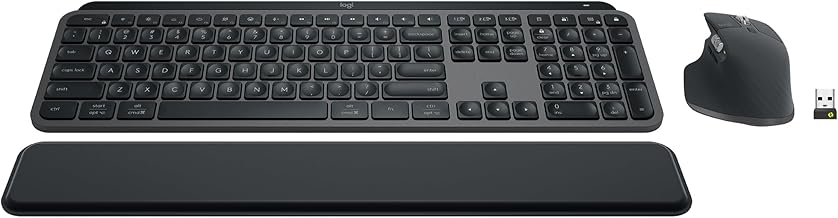
These two aren't really aimed at the same buyer. The MX Keys S Combo is a productivity-first typing solution that comes with a matching mouse; the Keychron Q6 Pro is a genuine custom mechanical keyboard for people who care about switch feel, sound, and full firmware-level customization. This comparison is based on manufacturer specifications and published spec-sheet data; we don't test keyboards in-house.
Some links below are affiliate links — we may earn a commission if you buy through them, at no extra cost to you. See our full disclosure.
The quick answer
Get the Logitech MX Keys S Combo if you want quiet, comfortable typing across multiple devices with zero setup — it comes with a matching MX Master 3S mouse, an auto-adjusting backlight, and pairs across 3 devices with a button press. Get the Keychron Q6 Pro if you want a real mechanical keyboard you can tune to your exact preference — full CNC aluminum body, hot-swappable switches, and open-source QMK/VIA firmware for complete remapping, at the cost of a louder, more involved setup.
Check current price on the Logitech MX Keys S Combo →
Comparison at a glance
| Feature | Logitech MX Keys S Combo | Keychron Q6 Pro |
|---|---|---|
| Price | Check current price | Check current price |
| Layout | Full-size | 100% full-size |
| Switch type | Low-profile scissor, laptop-style | Hot-swappable Keychron K Pro (factory pre-lubed) |
| Build | Aluminum top plate, laptop-style keys | Full CNC-machined aluminum body, double-gasket mount |
| Wireless | Bluetooth or Logi Bolt USB receiver | Bluetooth 5.1 (up to 3 devices) or USB-C wired |
| Multi-device | Pairs up to 3 devices | Pairs up to 3 devices via Bluetooth |
| Backlighting | Auto-adjusting proximity-sensing backlight | South-facing RGB, 22 modes |
| Included mouse | MX Master 3S (8,000 DPI, MagSpeed scroll) | Not included |
| Software | Logi Options+ (remapping, Smart Actions) | QMK/VIA (full firmware-level remapping) |
| Polling rate | Not specified for gaming-tier response | 1,000Hz wired / 90Hz wireless |
| Keycaps | Standard low-profile | Double-shot PBT |
| Best for | All-in-one productivity setup | Customizable mechanical typing experience |
MX Keys S Combo: overview
The MX Keys S Combo is built around convenience — the spherically-dished, laptop-profile keys are designed to reduce finger travel over long typing sessions, the backlighting senses your hands and adjusts automatically without you touching a setting, and it comes bundled with the MX Master 3S mouse, so there's no second peripheral to shop for. Pairing across three devices via Bluetooth or the included Logi Bolt receiver is genuinely painless.
Keychron Q6 Pro: overview
The Q6 Pro is a legitimate custom mechanical keyboard, not a typing-focused productivity accessory — its full-size body is CNC-machined from 6063 aluminum through more than two dozen manufacturing steps, with a double-gasket mount and silicone pads specifically engineered to reduce metal resonance and improve acoustic feel. The factory pre-lubed, hot-swappable switches mean you can change the entire typing feel without a soldering iron, and open-source QMK/VIA firmware gives you full remapping control at the hardware level rather than through a vendor app.
Switch type — scissor vs hot-swap mechanical
This is the core difference. The MX Keys S Combo uses low-profile scissor switches, the same category found in most modern laptop keyboards — quiet, low-travel, and consistent, but not swappable or individually tunable. The Q6 Pro's hot-swappable mechanical switches let you pull and replace individual switches to change the entire feel of the keyboard, and its double-gasket mounting system is specifically built to make mechanical switches sound and feel better than a standard keyboard case would.
Wireless & multi-device
Both pair with up to 3 devices over Bluetooth, and both offer a wired/dongle option for a more stable connection — the MX Keys S Combo through Logi Bolt, the Q6 Pro through USB-C. The meaningful difference is polling rate: the Q6 Pro specifies 1,000Hz over its wired USB-C connection (90Hz wireless), a spec aimed at users who care about input responsiveness, which Logitech doesn't emphasize for the MX Keys S Combo since it's built for typing, not competitive response times.
Build & backlighting
The MX Keys S Combo has an aluminum top plate over laptop-style keys — solid, but built for typing comfort rather than acoustics or heft. The Q6 Pro's full aluminum body and gasket-mount construction are specifically engineered around sound and feel, which is a meaningfully heavier, more premium build than a typical productivity keyboard. On lighting, the MX Keys S Combo's backlight is a practical, auto-adjusting white/amber light; the Q6 Pro's south-facing RGB with 22 modes is built for customization and aesthetics.
Battery life & customizability
Logitech doesn't publish a headline battery-life number as prominently as its multi-device pairing and Smart Actions remapping through Logi Options+. The Q6 Pro's real customization edge is QMK/VIA — genuinely open, firmware-level remapping that works independent of any vendor's software staying supported, versus the MX Keys S Combo's Logi Options+ app-based remapping.
Price & layout
Both are full-size layouts. On price, the comparison isn't quite apples-to-apples: the MX Keys S Combo's price includes a full mouse, while the Q6 Pro's price is for the keyboard alone — factor that in before comparing sticker prices directly.
Check the current MX Keys S Combo price → · Check the current Keychron Q6 Pro price →
Pros and cons
Logitech MX Keys S Combo - ✅ Includes a matching mouse — no second purchase needed - ✅ Auto-adjusting backlight, quiet scissor switches - ✅ Effortless 3-device Bluetooth pairing - ❌ Not swappable or firmware-remappable - ❌ Less premium build than a true mechanical keyboard
Keychron Q6 Pro - ✅ Full CNC aluminum body, double-gasket acoustic design - ✅ Hot-swappable switches, open QMK/VIA firmware - ✅ 1,000Hz wired polling rate - ❌ Keyboard only — no mouse included - ❌ Louder, heavier, more setup-involved than a typing-focused keyboard
Verdict — choose MX Keys S if / choose Q6 Pro if
Choose the MX Keys S Combo if your day is spent writing and switching between devices, you want a mouse included, and you'd rather not think about your keyboard once it's set up.
Choose the Keychron Q6 Pro if you care about switch feel and sound, want the ability to hot-swap switches or remap at the firmware level, and don't mind a louder, more hands-on setup.
Neither is the "wrong" choice — they're solving different problems. The MX Keys S Combo is the appliance; the Q6 Pro is the instrument.
See also
- Keychron Q6 Pro — full review
- MX Keys S Combo vs Keychron K2 HE — the compact mechanical alternative
- Logitech MX Master 3S vs Razer Pro Click Mini
FAQ
Is the Keychron Q6 Pro hot-swappable? Yes — its switches are hot-swappable, so you can change them without soldering, and it ships with factory pre-lubed Keychron K Pro switches installed.
Does MX Keys S work on Mac? Yes, Logitech officially supports macOS alongside Windows for the MX Keys S Combo, with Logi Options+ available on both platforms.
Which is better for typing? It depends what you value. The MX Keys S Combo's low-profile scissor switches are quiet and consistent for all-day office typing with minimal finger travel. The Q6 Pro's mechanical switches and gasket-mounted acoustics give a more tactile, customizable typing feel that many mechanical-keyboard users prefer — but it's a matter of preference, not a clear technical winner either way.
The Workflow Guide publishes independent research and comparisons for remote workers, creators, and small teams. We do not test keyboards in-house; this guide is based on manufacturer specifications and published spec-sheet data, and is reviewed by our editor before publishing.
Connection, audio, light, camera, desk and power, in the order that matters. Free 2-page PDF, no spam.
No spam. Unsubscribe anytime.
Products compared
Based on published specs and owner reviews — not hands-on testing.
- Logitech MX Keys S ComboCheck price →
- Keychron Q6 ProCheck price →
Founder of The Workflow Guide — an IT professional who researches home-office gear and productivity software from specs, documentation and published reviews. Full bio →