Keychron Q6 Pro Wireless Mechanical Keyboard: Full Rundown (2026)
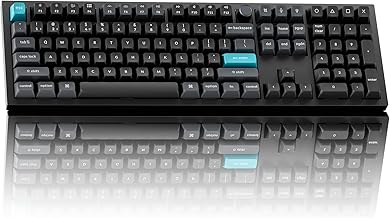
This is an affiliate link — we may earn a commission at no extra cost to you.
The Keychron Q6 Pro is a full-size wireless mechanical keyboard — number pad included — in a machined aluminium case. It connects over Bluetooth 5.1 to up to three devices or by USB-C cable, is hot-swappable, and supports QMK and VIA for remapping [1][2]. Trusted Reviews priced it at £185 / $210 at review [1]. This page is based on manufacturer specifications and published professional reviews; we don't test keyboards in-house.
Quick verdict
Trusted Reviews called the Q6 Pro "an excellent wireless mechanical keyboard," "incredibly well built," with a "responsive and comfortable typing experience," long battery life, and simple Bluetooth pairing [1]. Its downsides are price, weight, and RGB lighting that's dim through the standard keycaps [1]. If you want a premium full-size board for long typing days and need a number pad, it's one of the strongest wireless options.
Full specs
| Spec | Keychron Q6 Pro |
|---|---|
| Price at review | £185 / $210 [1] |
| Layout | Full size (number pad + navigation cluster) with volume knob [1] |
| Case | CNC-machined aluminium, gasket-mounted [1] |
| Weight | 2.16kg [1] |
| Switches | Keychron K Pro (reviewed with Banana soft-tactile, 57g); Red/Blue/Brown options [1] |
| Hot-swap | Yes, 3- and 5-pin switches [1] |
| Keycaps | Double-shot PBT, KSA profile [1] |
| Wireless | Bluetooth 5.1, up to 3 devices [1][2] |
| Wired | USB-C [1][2] |
| Battery | 4,000mAh; up to 300 hrs backlight off, 100 hrs lowest RGB (Keychron's figures) [1] |
| Software | QMK / VIA [1][2] |
| OS switch | Hardware Mac / Windows toggle [1] |
What stands out
- Build quality. The machined aluminium case has "no flex to speak of," and case foam plus pre-lubed switches and stabilisers keep it free of rattle and ping [1].
- Comfortable switches. Trusted Reviews found the Banana soft-tactile switches "felt excellent" for long writing sessions [1].
- Long battery life. Keychron quotes up to 300 hours with the backlight off; the reviewer charged it only once during their time with it [1].
- Multi-device. Pair with three devices over Bluetooth and switch with Fn + 1/2/3; a hardware toggle swaps between Mac and Windows layouts [1].
- Full size, done properly. A standard layout with the number pad and navigation keys where you expect them, plus a volume knob [1] — rare among enthusiast keyboards.
What to know before buying
- It's very heavy. 2.16kg [1]. It's a keyboard that stays on the desk.
- Dim RGB. With the solid standard keycaps, lighting acts more like an underglow and is barely visible at low brightness [1].
- Tall keycaps. The KSA profile is taller than standard OEM/Cherry caps and takes some getting used to [1]; a wrist rest helps.
- Price. It's expensive for a keyboard, even if the build justifies it [1].
- Software is functional, not slick. VIA is lightweight and powerful for remapping and macros, but less polished than first-party apps from big gaming brands [1].
- Not a gaming keyboard. The reviewer would pick a hall-effect or optical board for competitive gaming [1].
Who it's for
- Good fit: writers, analysts, and anyone who uses a number pad daily and wants a premium, quiet-sounding mechanical board that switches between computers.
- Maybe: people new to mechanical keyboards — the familiar full-size layout makes the switch easier [1], but the price is high for a first board.
- Skip it: if you carry your keyboard, want low-profile keys, or game competitively. Compare with the Logitech MX Keys S combo for a quieter, low-profile alternative.
FAQ
Is the Keychron Q6 Pro wireless? Yes — Bluetooth 5.1 to up to three devices, or wired over USB-C [1][2].
How long does the battery last? Keychron quotes up to 300 hours with the backlight off and 100 hours at the lowest RGB setting [1].
Is the Q6 Pro hot-swappable? Yes, for 3- and 5-pin switches [1].
How heavy is the Keychron Q6 Pro? 2.16kg [1].
Bottom line
The Q6 Pro is a superbly built full-size wireless mechanical keyboard with comfortable switches, long battery life, and easy multi-device pairing. It's heavy, pricey, and its lighting is dim, but for long typing days with a number pad it's one of the best wireless boards available.
Check the current price on the Keychron Q6 Pro →
See also
- Logitech MX Keys S combo vs Keychron Q6 Pro
- Best mechanical keyboards for work (2026)
- Keychron K2 HE
Sources
- Verdict, pros and cons, £185 / $210 price, full-size layout with volume knob, machined aluminium case, gasket mount, 2.16kg, Banana 57g soft-tactile switches, hot-swap 3/5-pin, double-shot PBT KSA keycaps, Bluetooth 5.1 to 3 devices + USB-C, 4,000mAh battery and Keychron's 300/100-hour figures, Mac/Windows toggle, QMK/VIA, dim RGB, gaming note — Trusted Reviews, Keychron Q6 Pro review
- Q6 Pro wireless (Bluetooth) and wired USB-C, QMK/VIA support — Keychron, Q6 Pro product page
The Workflow Guide publishes independent research on tech tools and gear. We do not test keyboards in-house; this page is based on manufacturer specifications and published professional reviews.
Connection, audio, light, camera, desk and power, in the order that matters. Free 2-page PDF, no spam.
No spam. Unsubscribe anytime.
Keychron Q6 Pro Wireless Mechanical Keyboard
Our pick, based on published specs and owner reviews — not hands-on testing.
Check Price on Amazon →Founder of The Workflow Guide — an IT professional who researches home-office gear and productivity software from specs, documentation and published reviews. Full bio →