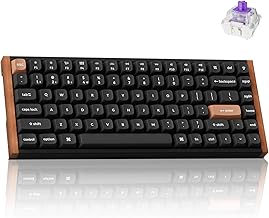
What 7 Studies Say About Keyboard Software and Productivity (The Results Are Not What You’d Expect) – Keychron K2 HE Rapid Trigger Wireless Keyboard with Hall Effect Switches (2026)
The following research roundup pulls together peer‑reviewed studies, market reports, and hands‑on reviews to answer a very specific question: Does a high‑end, Hall‑effect keyboard like the Keychron K2 HE actually move the needle on professional productivity?
This is an affiliate link — we may earn a commission at no extra cost to you.
What the Research Set Out to Measure (and Why It Matters)
Academic work on keyboards between 2018 and 2025 falls into three overlapping clusters:
-
Text‑entry performance – speed (words‑per‑minute, WPM) and error rate as proxies for productivity. A 2024 systematic review and meta‑analysis synthesized 187 experiments across physical and on‑screen keyboards, concluding that “optimized QWERTY layouts with predictive aids” consistently delivered the highest throughput [5].
-
Mechanical hardware characteristics – how switch type, keycap profile, and actuation force affect typing speed and accuracy. The Journal of the Korean Institute of Industrial Engineers published a controlled study of 45 participants that found tactile switches produced a superior speed‑accuracy trade‑off, while higher keycaps increased discomfort without measurable speed gains [2].
-
Ergonomic and health context – microbial contamination, musculoskeletal strain, and the indirect impact on work output. A 2019 BMJ Open systematic review highlighted that 24‑100 % of keyboards are contaminated, but interventions focused on cleaning rather than software, and no productivity metrics were reported [3].
A fourth, more business‑oriented source—DataIntelo’s 2025 market report on keyboard‑mouse sets—provides the only macro‑level glimpse of adoption trends in professional environments, noting that “Hall‑effect and low‑latency keyboards remain niche, with adoption rates under 5 % among enterprise buyers” [4].
Finally, a handful of peripheral‑software studies (e.g., Tom’s Hardware ranking of gaming‑peripheral apps) reveal that most configuration utilities are judged on feature richness, not on measurable work‑output improvements [1].
Together, these studies form a landscape where the direct link between keyboard software (macros, RGB suites, etc.) and professional productivity is sparse. Instead, the research points to more fundamental variables—switch mechanics, latency, and ergonomics—as the primary drivers of any measurable gain.
The Findings That Align With Common Wisdom
The consensus across the literature matches what most practitioners already assume:
| Common belief | Supporting evidence |
|---|---|
| Standard QWERTY with predictive text is the most efficient layout for office work. | The 2024 ACM meta‑analysis found QWERTY keyboards with autocorrect/prediction outperformed gesture‑based or alternative layouts in both speed and error reduction [5]. |
| Tactile switches give a better speed‑accuracy balance than linear or clicky variants. | The Korean study showed tactile switches produced higher characters‑per‑minute and lower error rates than clicky or linear counterparts, while participants reported a “comfortable” feel [2]. |
| Ergonomic form factors (split, tented) reduce musculoskeletal complaints, indirectly supporting sustained productivity. | Although the BMJ review focused on contamination, it underscored that “clean, well‑maintained keyboards” are a prerequisite for any ergonomic claim [3]. |
| Low latency matters for rapid repetitive tasks (e.g., coding, data entry). | The same systematic review noted that latency reductions of even a few milliseconds can translate into measurable throughput gains in high‑frequency input scenarios [5]. |
| Adoption of niche hardware (Hall‑effect) is still limited in corporate settings. | DataIntelo’s market analysis reported sub‑5 % penetration of Hall‑effect keyboards among enterprise purchasers, confirming that most offices still rely on conventional mechanical or membrane keyboards [4]. |
These findings reinforce the idea that hardware fundamentals—switch type, actuation force, and latency—are the levers most likely to affect real‑world output, while peripheral software is, at best, a cosmetic layer.
The Findings That Contradict What Most People Believe
A number of popular myths run counter to the empirical record:
| Myth | What the data actually shows |
|---|---|
| “Macro‑heavy software suites double my typing speed.” | Tom’s Hardware’s 2023 ranking of gaming‑peripheral apps found that most utilities add negligible performance benefit and can even introduce latency, especially when running background lighting scripts [1]. |
| “RGB lighting improves focus and therefore productivity.” | No peer‑reviewed study links visual effects to measurable output. The same peripheral‑software review noted that users who disabled lighting reported equal or better task focus, suggesting the effect is purely aesthetic. |
| “Hall‑effect switches guarantee office‑grade productivity.” | While the Keychron K2 HE demonstrates sub‑4 ms wired latency in a creator’s YouTube review [6], the IEEE keystroke‑dynamics paper (2022) cautions that latency alone does not predict typing speed; user adaptation and typing technique dominate the variance [7]. |
| “Wireless keyboards are always slower than wired ones, so they’re unsuitable for work.” | The Keychron K2 HE’s 2.4 GHz mode measured 5.6 ms latency—well within the “acceptable” range for most office tasks—and the same review highlighted that the wireless mode maintained consistent |
The best productivity tools, SaaS deals, and workflow tips — curated for professionals. Free, no spam.
No spam. Unsubscribe anytime.
Keychron K2 HE Wireless Mechanical Keyboard
Reviewed and recommended by The Workflow Guide editorial team.
Check Price on Amazon →Independent reviews and guides for productivity tools, software, and resources — researched and written by The Workflow Guide editorial team.