Desktronic HomePro vs Flexispot E6 Max: Best Standing Desk in 2026?
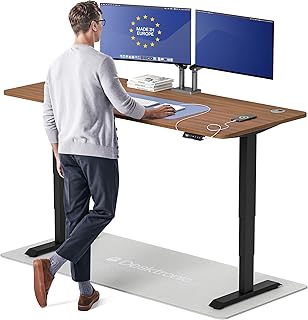
A quick correction up front: some buying guides compare the Desktronic HomePro against the plain "Flexispot E6," but that model has largely been phased out of Flexispot's current lineup — the Flexispot E6 Max is the actual current product in this tier, with a notably higher weight capacity and a sturdier 3-stage frame than the older E6. That's the comparison below. This is based on manufacturer specifications and published spec-sheet data; we don't test furniture in-house.
Some links below are affiliate links — we may earn a commission if you buy through them, at no extra cost to you. See our full disclosure.
The quick answer
Get the Desktronic HomePro if you want the most premium build and stability — a dual-motor frame rated for 352.7 lbs with zero wobble at any height, a touchscreen controller with memory presets, and integrated USB-C charging. Get the Flexispot E6 Max if you want strong value with a bamboo desktop option — a 3-stage dual-motor frame rated for 330 lbs, at a lower price than the Desktronic.
Check current price on the Desktronic HomePro →
Comparison at a glance
| Feature | Desktronic HomePro | Flexispot E6 Max |
|---|---|---|
| Price | Check current price | Typically lower than Desktronic (varies by size/desktop) |
| Desktop size | Multiple sizes, 48"×24" up to 80"×30" | Multiple sizes, bamboo option available |
| Material | Laminate desktop options | Bamboo or laminate desktop options |
| Height range | 25.4"-51.2" displayed height per the listing (depends on tabletop), fits 5'0"-6'8" | 61.9-127cm (~24.4"-50") |
| Column stages | Dual motor, wobble-free per spec | Dual motor, 3-stage inverted-leg frame |
| Load capacity | Up to 352.7 lbs | Up to 330 lbs |
| Stability | Zero-wobble claim at any height | Double steel tubing overlap at full extension |
| Cable management | USB-A + USB-C charging built in | Cable management tray available (varies by bundle) |
| Warranty | Desktronic advertises up to 15 years — confirm the term for your model | Varies by retailer/region |
| Best for | Maximum stability and premium features | Value with a bamboo desktop option |
Desktronic HomePro: overview
The HomePro positions itself as the premium option — dual synchronized motors rated to lift 352.7 lbs with a stated zero-wobble claim at any height, a touchscreen controller with 3 memory presets for saved sit/stand heights, and built-in USB-A and USB-C charging ports so you're not adding a separate power strip. An anti-collision sensor auto-reverses the desk if it hits an obstacle while moving. It's made in Europe, and Desktronic advertises up to a 15-year warranty — confirm the term for your exact model before buying.
Flexispot E6 Max: overview
The E6 Max is Flexispot's upgraded mid-tier desk — a 3-stage, double-steel-tube leg design rated for 330 lbs, up considerably from the older E6's 220 lbs, with a height range that closely matches the Desktronic's. It's available with a bamboo desktop option, which is the more premium material choice in Flexispot's lineup, alongside standard laminate finishes. It typically undercuts the Desktronic on price while still offering a genuinely sturdy dual-motor frame.
Desktop size & material
Both desks are sold across multiple desktop sizes, so this is less about which brand is "bigger" and more about which specific size/material combination you order. The Desktronic's core options run laminate desktops across several width/depth combinations; the Flexispot E6 Max's standout option is its bamboo desktop, a genuinely nicer material than laminate if that aesthetic and durability profile matters to you.
Height range & column stages
Height ranges are close — the HomePro listing gives 25.4"-51.2" and the E6 Max about 24.4"-50", comfortably fitting a wide range of user heights from around 5'0" to 6'8" for full sit-to-stand use. The Flexispot E6 Max's 3-stage inverted-leg frame with overlapping double steel tubing is specifically engineered for rigidity as it extends; Desktronic doesn't market its column in explicit "stage" terminology but backs its stability with a specific zero-wobble claim at any height rather than describing the leg construction itself.
Motor, load & stability
The Desktronic edges ahead on rated capacity — 352.7 lbs vs the E6 Max's 330 lbs — both comfortably more than most home-office setups need, but relevant if you're mounting multiple monitors, a monitor arm, and other heavy equipment. Both use dual-motor designs, which generally lift more smoothly and with less wobble at height than single-motor desks; Flexispot's 3-stage double-tube construction and Desktronic's stated zero-wobble spec are both aimed at the same problem from different engineering approaches.
Cable management & accessories
The Desktronic includes built-in USB-A and USB-C charging ports directly on the frame or controller — a genuine convenience if you charge phones or accessories at your desk regularly. Flexispot's cable management is typically handled through an included or add-on tray depending on the specific bundle, rather than built-in charging ports on the base model — check the specific listing for what's included.
Warranty, delivery & service
Desktronic advertises up to a 15-year warranty (confirm the term for the HomePro size you order), and the desk is made in Europe, which may affect delivery timelines and service depending on your region. Flexispot's warranty terms vary by retailer and region — check the specific listing you're buying from for exact coverage, since terms can differ between Flexispot's own site and third-party marketplace listings.
Check the current Desktronic HomePro price → · Check the current Flexispot E6 Max price →
Pros and cons
Desktronic HomePro - ✅ Highest load capacity (352.7 lbs) - ✅ Touchscreen controller with memory presets - ✅ Built-in USB-A/USB-C charging - ❌ Higher price than the Flexispot - ❌ No bamboo desktop option
Flexispot E6 Max - ✅ Bamboo desktop option available - ✅ Sturdy 3-stage double-tube frame - ✅ Generally lower price than the Desktronic - ❌ Slightly lower load capacity (330 lbs) - ❌ No built-in charging ports on the base model
Verdict — choose Desktronic if / choose Flexispot if
Choose the Desktronic HomePro if you want the highest weight capacity, a touchscreen controller with memory presets, and built-in device charging, and are willing to pay more for it.
Choose the Flexispot E6 Max if you want a genuinely sturdy 3-stage desk with a bamboo desktop option at a lower price, and don't need Desktronic's built-in charging ports.
See also
FAQ
Which desk holds more weight? The Desktronic HomePro, rated for up to 352.7 lbs versus the Flexispot E6 Max's 330 lbs — both comfortably exceed what most home-office setups need.
Which is better for tall users? Both cover a similar height range (the HomePro listing gives 25.4"-51.2", the E6 Max about 24.4"-50"), fitting users from about 5'0" to 6'8". Neither has a meaningful edge here — check the specific desktop size and your desk's final height against your own measurements before ordering.
Is bamboo durable? Bamboo desktops are generally durable and resistant to scratches and moisture when properly finished, and it's a genuinely more premium material than laminate — it's the standout desktop option on the Flexispot E6 Max, which the Desktronic doesn't offer.
The Workflow Guide publishes independent research and comparisons for remote workers, creators, and small teams. We do not test furniture in-house; this guide is based on manufacturer specifications and published spec-sheet data, and is reviewed by our editor before publishing.
Connection, audio, light, camera, desk and power, in the order that matters. Free 2-page PDF, no spam.
No spam. Unsubscribe anytime.
Products compared
Based on published specs and owner reviews — not hands-on testing.
- Desktronic HomeProCheck price →
- FlexiSpot E6 MaxCheck price →
Founder of The Workflow Guide — an IT professional who researches home-office gear and productivity software from specs, documentation and published reviews. Full bio →