Desktronic HomePro vs Uplift V3 Standing Desk: Specs Compared (2026)
By The Workflow Guide
The Quick Answer
Both are dual-motor electric standing desks that lift around 350 lb at 2 inches per second. The real differences are height range, warranty, and where you buy:
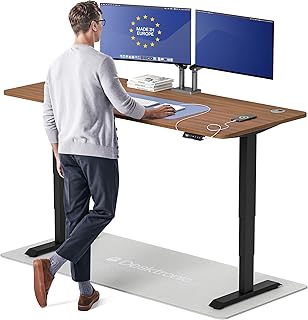
- Desktronic HomePro goes higher (up to 51.2 in) and comes as a complete desk with a one-piece top, a touchscreen controller and built-in USB-A/USB-C charging. It's sold on Amazon.
- Uplift V3 goes lower (from about 22.6 in with a 1-inch top), has a published ANSI/BIFMA certification and a 15-year warranty on all Uplift products, and is configured and bought from Uplift directly.
Verdict: If you're tall, or you want a complete desk with charging ports that arrives in one box, the HomePro is the simpler pick. If you're on the shorter side, want the longest clearly-stated warranty, or want to pick from Uplift's many tops and accessories, the V3 is the safer choice.
Key Specs Side by Side
| Spec | Desktronic HomePro | Uplift V3 |
|---|---|---|
| Motors | Dual synchronized motors | Dual motor |
| Lifting capacity | 352.7 lb | 355 lb |
| Speed | 2 in/s | 2 in/s |
| Height range | 25.4–51.2 in (displayed height, depends on tabletop); listed for users 5′0″–6′8″ | 21.6–47.7 in frame only (23.8–49.9 in with foot spacers) — about 22.6–48.7 in with a 1-inch top |
| Legs | Not stated in the listing | 3-stage |
| Controller | Touchscreen, 3 memory presets, anti-collision auto-reverse | Keypad chosen when you configure the desk; anti-collision |
| Charging | Integrated USB-A and USB-C ports | Not built into the frame |
| Desktop | One-piece top with rounded corners; this listing is the 72×30 in size (its description says 70×30 in) | Sold with a choice of desktops, or as a frame only |
| Noise | Not stated | Under 48 dB |
| Certification | Not stated | ANSI/BIFMA X5.5-2021 and G1-2013 |
| Warranty | Desktronic advertises "up to a 15-year warranty" — check the term for your exact model | 15 years on all Uplift products |
| Made in | Listed as "Made in Europe" | Not stated on the spec sheet |
Sources: the Desktronic HomePro Amazon listing (the product our link goes to), Desktronic's standing desk page, and the official Uplift V3 frame spec sheet.
Where They Actually Differ
Height range — the deciding factor for most people. The HomePro's range tops out at 51.2 inches, so taller users (Desktronic lists up to 6′8″) have more headroom for a standing position with monitors at eye level. The Uplift V3 starts lower — about 22.6 inches with a 1-inch top — which matters for shorter users who need a low sitting height. The HomePro's lowest setting is 25.4 inches.
Complete desk vs configurable system. The HomePro arrives as a finished desk: one-piece top, touchscreen controller with three memory presets, and USB-A/USB-C ports built in. Desktronic says it assembles in under 30 minutes. The Uplift V3 is a frame you configure — choose the top size and material, controller and accessories on Uplift's site. That's more work up front but gives you more options.
Warranty and certification. Uplift publishes a 15-year warranty on all of its products and states that the V3 meets ANSI/BIFMA X5.5-2021 for safety, durability and structural performance. Desktronic advertises "up to" a 15-year warranty; the listing itself only says "full manufacturer warranty", so confirm the term for the HomePro before you buy. We couldn't find a published certification for the HomePro.
Lifting capacity and speed are a wash. 352.7 lb vs 355 lb, both at 2 inches per second — either handles a dual- or triple-monitor setup.
Who Should Pick Which
Pick the Desktronic HomePro if: - You're tall and want a higher maximum height - You want a complete desk with built-in charging in one purchase - You're buying through Amazon
Pick the Uplift V3 if: - You're on the shorter side and need a lower minimum height - A clearly stated 15-year warranty and BIFMA certification matter to you - You want to choose your own top, size and accessories
Alternatives
- FlexiSpot E6 Max — see our Desktronic HomePro vs FlexiSpot E6 Max comparison or the FlexiSpot E6 Max page.
- Still deciding? Our best standing desk for a home office guide covers the wider field.
The Workflow Guide publishes independent research and comparisons. We do not test products in-house; this page is based on the manufacturers' listings and published spec sheets (linked above).
Connection, audio, light, camera, desk and power, in the order that matters. Free 2-page PDF, no spam.
No spam. Unsubscribe anytime.
Desktronic HomePro 70x30 Standing Desk
Our pick, based on published specs and owner reviews — not hands-on testing.
Check Price on Amazon →Founder of The Workflow Guide — an IT professional who researches home-office gear and productivity software from specs, documentation and published reviews. Full bio →