Ergotron LX Dual Monitor Arm, VESA Desk Mount: Full Rundown (2026)
This is an affiliate link — we may earn a commission at no extra cost to you.
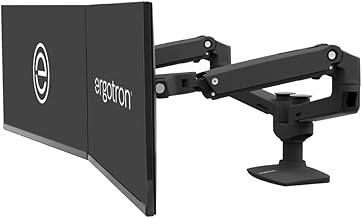
Ergotron's LX line is one of the most established names in monitor arms, and the dual-monitor kit lets you mount two displays on articulating arms instead of stock stands, freeing up real desk space and letting you position each screen independently. This is based on manufacturer specifications and published spec-sheet data; we don't test desk gear in-house.
Who it's for
Good fit if you run a two-monitor setup and want each screen independently adjustable for height, tilt, and distance — genuinely useful for shared desks or anyone who switches between sitting and standing. Skip it if you only run one monitor, or if your monitors don't have standard VESA mounting holes on the back.
Specs
| Spec | Ergotron LX Dual Monitor Arm |
|---|---|
| Price | Check current price |
| Mount type | VESA-compatible (75x75mm and 100x100mm) |
| Adjustability | Height, tilt, swivel, and pan on each arm independently |
| Mechanism | Spring-assisted, tool-free height adjustment |
| Mounting options | Desk clamp or grommet mount (both typically included) |
| Monitor support | Designed for standard desktop monitors within Ergotron's published weight range — check your monitor's weight against the listing before buying |
What stands out
The spring-assisted arm is the real differentiator over cheaper monitor arms — it holds position at any height without drifting, and you can reposition a monitor with one hand rather than fighting a stiff joint or a gas-strut arm that sags over time. Freeing up the desk space that two separate monitor stands would otherwise take is a genuine, everyday benefit if desk real estate is tight.
What to know before buying
Your monitors need VESA mounting holes on the back (75x75mm or 100x100mm) — if a monitor doesn't have them, it can't go on this arm without an adapter. Also confirm each monitor's weight falls within Ergotron's published range for this specific model before buying; monitor arms are rated to a max weight per arm, and going over it affects both stability and the warranty.
Bottom line
For a real dual-monitor desk setup where independent positioning and desk space matter, Ergotron's LX line has a long track record as one of the sturdier, better-engineered options in this category. Confirm VESA compatibility and monitor weight before buying.
Check the current price on the Ergotron LX Dual Monitor Arm →
The Workflow Guide publishes independent research on tech tools and gear. We do not test desk gear in-house; this page is based on manufacturer specifications and published spec-sheet data.
Connection, audio, light, camera, desk and power, in the order that matters. Free 2-page PDF, no spam.
No spam. Unsubscribe anytime.
Ergotron LX Dual Monitor Arm, VESA Desk Mount
Our pick, based on published specs and owner reviews — not hands-on testing.
Check Price on Amazon →Founder of The Workflow Guide — an IT professional who researches home-office gear and productivity software from specs, documentation and published reviews. Full bio →