Dell P2725QE 27" 4K USB-C Monitor: Full Rundown (2026)
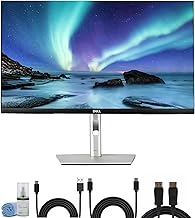
This is an affiliate link — we may earn a commission at no extra cost to you.
The Dell Pro 27 Plus (P2725QE) is a 27-inch 4K business monitor built around a USB-C hub: one cable to your laptop carries video, data, wired Ethernet, and up to 90W of charging [1][2]. It runs at 100Hz — unusually quick for a 4K office monitor — and comes on a fully adjustable stand [1][2]. TechRadar's review lists it at $519.99 on Dell's site [1]. This page is based on manufacturer specifications and published professional reviews; we don't test monitors in-house.
Quick verdict
TechRadar called it "a serious choice for professionals" and concluded that the mix of 4K resolution, USB-C with Power Delivery, and an adaptable stand "makes it well worth the investment" for productivity-focused buyers [1]. The main knock is price [1]. Buy it if you dock a laptop every day and want to replace a separate dock and charger; skip it if your computer is a desktop tower, where the hub adds cost you won't use.
Full specs
| Spec | Dell P2725QE |
|---|---|
| List price | $519.99 on Dell.com at review time [1] |
| Panel | 27" IPS [1][2] |
| Resolution | 3840×2160 (4K UHD) [1][2] |
| Refresh rate | 100Hz [1][2] |
| Brightness | 350 nits [2] |
| Contrast | 1,500:1 native [2] |
| Color | 99% sRGB [2] |
| Video inputs | 1× HDMI 2.1, 1× DisplayPort 1.4, USB-C upstream [1] |
| USB-C power | Up to 90W Power Delivery [1][2] |
| Hub ports | 1× USB-C downstream (up to 15W charging), 3× USB-A downstream, Gigabit RJ45 Ethernet [1][2] |
| Quick-access ports | Pop-out USB-C and USB-A on the front edge [2] |
| Stand | Height up to 150mm, tilt −5° to 21°, swivel ±45°, pivot ±90° [2] |
| VESA | Yes [1] |
| Eye comfort | ComfortView Plus low-blue-light backlight; TÜV 4-star eye comfort [2] |
| In the box | DisplayPort cable, USB-C to USB-C cable, USB-C to USB-A cable [1] |
What stands out
- True one-cable docking. TechRadar describes the built-in USB-C port with power delivery as "excellent for laptops, making it a one-cable solution," with the extra ports working as a hub for drives and accessories [1]. Up to 90W covers most 13–15" work laptops [1][2].
- Wired Ethernet in the monitor. The RJ45 port gives a docked laptop a wired connection with no extra adapter [1].
- 100Hz at 4K. Most 4K office monitors run at 60Hz; 100Hz makes scrolling and cursor movement smoother [1][2].
- A stand that adjusts properly. Height, tilt, swivel, and pivot to portrait [1].
- Anti-glare finish. TechRadar found it held up well under lamps and overhead lights, though direct light can still be annoying [1].
What to know before buying
- Price. TechRadar rated it four stars on price — "fairly expensive" [1]. The premium only pays off if you use the hub.
- Office color, not creative color. 99% sRGB [2] is right for documents and web work, but it isn't a wide-gamut panel. A German magazine test summarized by Testberichte also flagged sRGB-only coverage and the backlight as weak points [3].
- Check your laptop's wattage. 90W covers most business laptops; power-hungry 16" workstations may charge slowly under heavy load.
- Desktop users pay for features they won't use. If you connect a tower over DisplayPort, a hub-less 4K monitor such as the LG 27US500-W costs far less.
Who it's for
- Good fit: hybrid workers who dock a laptop daily; anyone replacing a separate dock and charger; people who spend long days at the screen and want a properly adjustable stand.
- Maybe: MacBook users with only two ports — TechRadar specifically called out the hub's value there [1].
- Skip it: desktop-only setups, and color-critical photo or video work.
FAQ
Does the Dell P2725QE charge laptops? Yes — up to 90W over its USB-C upstream port [1][2].
What refresh rate is the P2725QE? 100Hz at 3840×2160 [1][2].
Does it have an Ethernet port? Yes, RJ45, which a USB-C-connected laptop can use [1].
Is the P2725QE good for photo editing? It covers 99% sRGB [2], which suits light editing, but it isn't a wide-gamut creative display [3].
Bottom line
The P2725QE is a business monitor that earns its price through connectivity: 4K at 100Hz, a 90W USB-C hub with Ethernet, and a stand that fully adjusts. If you dock a laptop every day, it can replace your dock and charger. If you don't, a cheaper 4K panel makes more sense.
Check the current price on the Dell P2725QE →
See also
- LG UltraFine 27US500-W vs Dell P2725QE — full comparison
- Best 4K USB-C monitors for a home office (2026)
- Dell UltraSharp U2725QE
Sources
- $519.99 Dell price, 27" IPS 3840×2160 100Hz, HDMI 2.1 / DP 1.4 / USB-C upstream 90W PD / USB-C downstream / 3× USB-A / RJ45, included cables, height-tilt-swivel-pivot stand, VESA, anti-glare finish in use, one-cable laptop setup, "fairly expensive", final verdict — TechRadar, Dell Pro P2725QE Plus 4K monitor review (Collin Probst)
- 350 nits, 1,500:1 native contrast, 99% sRGB, 100Hz, 90W USB-C Power Delivery, USB-C downstream up to 15W, Gigabit Ethernet, pop-out quick-access ports, stand ranges (150mm height, −5° to 21° tilt, ±45° swivel, ±90° pivot), ComfortView Plus, TÜV 4-star eye comfort — Dell, Pro 27 Plus 4K USB-C Hub Monitor (P2725QE) product page
- Magazine test summary: praised sharp, color-accurate 4K image, connectivity and stand; criticized price, backlight, and sRGB-only coverage — Testberichte.de, Dell Pro 27 Plus P2725QE test summary
The Workflow Guide publishes independent research on tech tools and gear. We do not test monitors in-house; this page is based on manufacturer specifications and published professional reviews.
Connection, audio, light, camera, desk and power, in the order that matters. Free 2-page PDF, no spam.
No spam. Unsubscribe anytime.
Dell P2725QE 27in 4K USB-C Monitor
Our pick, based on published specs and owner reviews — not hands-on testing.
Check Price on Amazon →Founder of The Workflow Guide — an IT professional who researches home-office gear and productivity software from specs, documentation and published reviews. Full bio →