Elgato Key Light Neo with Monitor Mount: Specs, Reviews & Who It's For (2026)
This is an affiliate link — we may earn a commission at no extra cost to you.
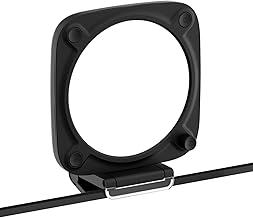
The Key Light Neo is Elgato's compact 15 cm square LED panel that clips onto the top of a monitor or laptop screen, aimed at people who want to look better on video calls without setting up a stand light. It lists at $89.99 [1]. This page is based on manufacturer specifications and independent professional reviews; we don't test lighting in-house.
Quick verdict
For a single desk where you take calls or stream from the same spot every day, the Neo is one of the easiest ways to get soft, even light on your face — GamingTrend scored it 90/100 and called out its "excellent light fill" and mount engineering [2]. The main catch is that how bright it gets depends on what you plug it into, and the brightest setting needs a power supply that isn't in the box.
Full specs
| Spec | Elgato Key Light Neo |
|---|---|
| List price | $89.99 [1] |
| Brightness | 400 lm on USB-A (4.5W) · 700 lm on USB-C (7.5W) · 1,000 lm on a 3A power supply (12W) [1] |
| Colour temperature | 2900K–7000K [1] |
| Colour rendering (CRI) | >94 [1] |
| Max power draw | Up to 15W [1] |
| Control | USB-C or Wi-Fi (2.4GHz / 5GHz) via Elgato Control Center [1] |
| Size | 150 × 150 × 38 mm (5.9 × 5.9 × 1.49 in) [1] |
| Weight | 246 g (8.68 oz) [1] |
| Mount | Monitor mount with 1/4" thread; tripod thread on the light [1][2] |
| In the box | Light, monitor mount, 1m USB-C to USB-A cable, 1.5m USB-A extension, USB-A to USB-C adapter [1] |
| Warranty | 2 years [2] |
Brightness: the detail most buyers miss
The 1,000-lumen headline figure needs an external 3A power supply. The box ships with USB cables, not a power adapter [1]. Plugged into a laptop's USB-A port you get 400 lumens; on a USB-C port, 700 [1]. For lighting one face at arm's length, 700 lumens is generally plenty — but if your room is dark or you sit farther back, budget for a 3A USB-C power adapter.
What reviewers highlight
- Soft, even light. GamingTrend notes that, unlike a ring light, it lights a square diffused area evenly, without the ring-shaped reflections a ring light leaves in your eyes or glasses [2].
- Mount design. The clamp has a transparent front, so you can hang it directly over a webcam without blocking the lens — GamingTrend singles this out as "excellent engineering" [2].
- Portability. GamingTrend rates it "very portable" and "great for portable uses" — it runs from USB, so it moves between desks or into a laptop bag easily [2].
- Control options. You can adjust brightness and temperature from Elgato's Control Center app on desktop or phone, over Wi-Fi or USB [1][2].
What to know before buying
- Price. Reviewers' main complaint is that cheaper lights exist [2]. You're paying for the build quality, diffusion, and software.
- One light, one person. It's sized to light a single face at a desk. For a larger filming area or a multi-camera setup, a full-size Key Light or a panel on a stand is the better tool — see our best lighting for video calls guide.
- Desk lighting is a different job. The Neo points at you, not your desk. If your goal is lighting your keyboard and papers, a monitor light bar like the BenQ ScreenBar Pro does that job.
FAQ
How bright is the Key Light Neo? 400 lumens on USB-A, 700 on USB-C, and up to 1,000 with a 3A power supply [1].
Does it come with a power adapter? No — it ships with USB cables and an adapter plug, not a wall power supply [1].
Does it work with a laptop? Yes. GamingTrend describes the mount as a laptop clamp [2], and it can run from the laptop's USB port at reduced brightness [1].
Does it need Wi-Fi? No. It can be controlled over USB-C or over 2.4GHz/5GHz Wi-Fi through Elgato Control Center [1].
Bottom line
If you want a noticeable upgrade on video calls from one compact light that lives on your monitor, the Key Light Neo is a well-reviewed, well-engineered choice. Plug it into USB-C (or add a 3A adapter) to get the brightness you're paying for.
Check the current price on the Elgato Key Light Neo →
See also
Sources
- Brightness by power source, colour temperature, CRI, power draw, connectivity, dimensions, weight, box contents, price — Markertek, Elgato Key Light Neo
- Light quality vs ring lights, transparent clamp, portability, Control Center, 2-year warranty, price as main con, 90/100 score — GamingTrend, Elgato Key Light Neo review
The Workflow Guide publishes independent research on tech tools and gear. We do not test lighting in-house; this page is based on manufacturer specifications and published professional reviews.
Connection, audio, light, camera, desk and power, in the order that matters. Free 2-page PDF, no spam.
No spam. Unsubscribe anytime.
Elgato Key Light Neo with Monitor Mount
Our pick, based on published specs and owner reviews — not hands-on testing.
Check Price on Amazon →Founder of The Workflow Guide — an IT professional who researches home-office gear and productivity software from specs, documentation and published reviews. Full bio →