BenQ ScreenBar Pro Monitor Light Bar: Specs, Reviews & Who It's For (2026)
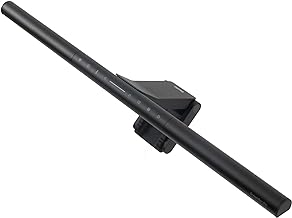
This is an affiliate link — we may earn a commission at no extra cost to you.
The ScreenBar Pro is the top model in BenQ's monitor light bar line: a bar that clamps to the top of your monitor and lights your desk without glaring off the screen or taking up desk space. It adds an ultrasonic presence sensor that turns the light on when you sit down and off when you leave. It costs $139 in the US [2]. This page is based on BenQ's published specifications and independent professional reviews; we don't test lighting in-house.
Quick verdict
If you work long hours at a monitor and your desk lamp either glares off the screen or eats space, the ScreenBar Pro is a well-reviewed fix. Digital Camera World called it "a fantastic device that provides bright and even lighting to your workspace" with "incredible build quality" [2]. The trade-offs are the price — it's a lot for a desk light — and touch controls the same reviewer found temperamental [2].
Full specs
| Spec | BenQ ScreenBar Pro |
|---|---|
| Price | $139 (US) / £119 (UK) [2] |
| Centre brightness | >1,000 lux [1] |
| Coverage | 500 lux across an 85 × 50 cm area [1] |
| Colour temperature | 2700K–6500K, adjustable [1] |
| Auto-dimming | Ambient light sensor adjusts toward 500 lux [1] |
| Presence sensor | Ultrasonic, detects you at about 60 ± 10 cm; auto on/off [1] |
| Power | USB-C, 5V / 1.7A, 8.5W max; 15W adapter included [1] |
| Monitor fit | 0.43–6.5 cm thick; curved screens from 1000R to 1800R [1] |
| Flicker / blue light | Meets IEEE PAR1789 flicker guidance and IEC/EN 62471 blue-light safety [1] |
| Size | 50 × 13.5 × 9.2 cm [2] |
| In the box | Light bar, USB-C power adapter, quick start guide [1] |
How it differs from a desk lamp
A desk lamp sits beside your monitor and either throws light onto the screen (glare) or into your eyes. BenQ's ASYM-Light design aims the light down and forward from the top of the monitor, so the desk in front of the screen is lit while the screen itself isn't [1]. BenQ says this third-generation optic is about 34% brighter than the standard ScreenBar [1]. The design also leaves the camera position clear, so a webcam on top of the monitor isn't blocked [1].
What reviewers highlight
- Coverage. Digital Camera World praises "fantastic lighting coverage" and "ultrawide illumination" [2] — useful on wide or ultrawide monitors where smaller bars leave the corners dim.
- Mount. The same review calls out an "effective mounting clip" and "excellent clamp" [2]. BenQ rates the clamp for curved monitors down to 1000R [1].
- Build quality. "Beautifully built" with "excellent build quality" [2].
- Automatic behaviour. The ultrasonic presence sensor switches the light on and off as you arrive and leave, and the ambient sensor adjusts brightness through the day [1].
What to know before buying
- Touch controls. Digital Camera World found the "touch controls are temperamental" and the "buttons aren't as responsive as ideal" [2].
- Price. The reviewer describes it as something that "will be a luxury for most people" [2]. If you don't need the presence sensor or curved-monitor support, cheaper monitor light bars exist.
- Check your monitor's thickness. The clamp fits screens from 0.43 to 6.5 cm thick [1]. Very thick monitor backs, or monitors with a curved top edge outside the 1000R–1800R range, may not fit.
- It lights the desk, not you. For video calls, the ScreenBar won't light your face the way a front light does. Pair it with a light aimed at you, like the Elgato Key Light Neo, if calls are the priority.
FAQ
Does the ScreenBar Pro work with curved monitors? Yes — BenQ lists support for curvature from 1000R to 1800R [1].
Does it block my webcam? BenQ says the design leaves the camera position unblocked [1].
Can I power it from my monitor's USB port? It runs on USB-C at up to 8.5W [1]. A monitor USB-C port that supplies that much power should work; otherwise use the included 15W adapter [1].
What does the presence sensor do? It uses ultrasonic detection at roughly 60 cm to switch the light on when you sit down and off when you leave [1].
Bottom line
For long working days at a monitor, the ScreenBar Pro is one of the most thoroughly engineered ways to light your desk without glare, and reviewers rate its coverage and build highly. Confirm your monitor fits the clamp and that the price makes sense for how much you'll use it.
Check the current price on the BenQ ScreenBar Pro →
See also
Sources
- Illuminance, coverage, colour temperature, ambient and ultrasonic sensors, power, monitor compatibility, flicker and blue-light standards, ASYM-Light brightness claim, unblocked camera, box contents — BenQ, ScreenBar Pro product page
- Price, dimensions, coverage, mount, build quality, touch-control complaint, verdict — Digital Camera World, BenQ ScreenBar Pro review
The Workflow Guide publishes independent research on tech tools and gear. We do not test lighting in-house; this page is based on manufacturer specifications and published professional reviews.
Connection, audio, light, camera, desk and power, in the order that matters. Free 2-page PDF, no spam.
No spam. Unsubscribe anytime.
BenQ ScreenBar Pro LED Monitor Light Bar
Our pick, based on published specs and owner reviews — not hands-on testing.
Check Price on Amazon →Founder of The Workflow Guide — an IT professional who researches home-office gear and productivity software from specs, documentation and published reviews. Full bio →