GVM RGB LED Video Light Kit: Full Rundown (2026)
This is an affiliate link — we may earn a commission at no extra cost to you.
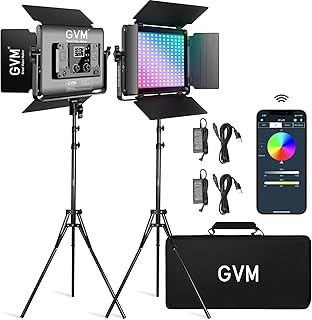
GVM's RGB LED panel lights are a common choice for streaming and video setups that want full-color lighting beyond the standard white/warm range most desk lights offer. This is based on manufacturer specifications and published spec-sheet data; we don't test lighting gear in-house.
Who it's for
Good fit if you want RGB color effects for streaming backgrounds or creative video lighting, not just functional white light for calls. Skip it if you just need practical desk/call lighting — a simpler white-light panel like the Elgato Key Light is cheaper and easier to use for that.
Specs
| Spec | GVM RGB LED Video Light Kit |
|---|---|
| Price | Check current price |
| Color range | RGB + adjustable white color temperature (typically 3200K-5600K across GVM's RGB line) |
| Control | App/Bluetooth control |
| Scene modes | Multiple preset lighting effects |
| Build | Aluminum alloy housing |
What stands out
Full RGB control plus adjustable white color temperature gives you both functional lighting and creative color effects from one fixture — useful for streamers who want to switch between clean on-camera lighting and colored background/mood lighting without separate equipment. App/Bluetooth control lets you adjust settings without touching the panel itself.
What to know before buying
GVM sells several RGB panel models at different price and power points — confirm the exact specs (brightness, panel size, kit contents) on the specific listing before buying, since "GVM RGB LED Video Light Kit" covers more than one configuration across their lineup.
Bottom line
For streamers or creators who want RGB color effects alongside functional lighting, GVM's RGB panels are a well-established, reasonably priced option — just confirm the exact kit configuration before ordering.
Check the current price on the GVM RGB LED Video Light Kit →
The Workflow Guide publishes independent research on tech tools and gear. We do not test lighting gear in-house; this page is based on manufacturer specifications and published spec-sheet data.
Connection, audio, light, camera, desk and power, in the order that matters. Free 2-page PDF, no spam.
No spam. Unsubscribe anytime.
GVM RGB LED Video Light Kit
Our pick, based on published specs and owner reviews — not hands-on testing.
Check Price on Amazon →Founder of The Workflow Guide — an IT professional who researches home-office gear and productivity software from specs, documentation and published reviews. Full bio →