Logitech C922x vs Razer Kiyo Pro: Best Mid-Range Webcam in 2026?
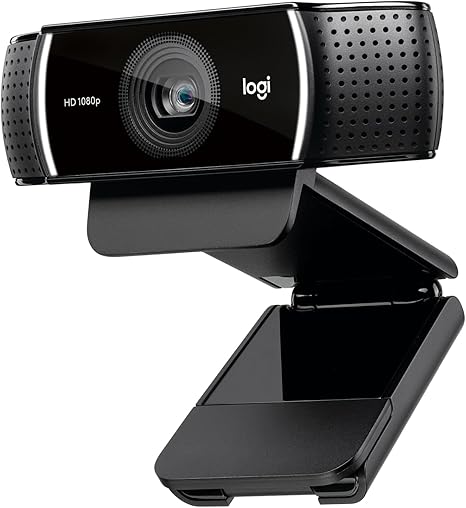
Both of these sit in the same practical tier — genuine upgrades over a laptop camera without paying flagship prices — but they get there differently. The C922x leans on a reliable, well-established feature set; the Kiyo Pro leans on a larger sensor built specifically for low light. This comparison is based on manufacturer specifications and published spec-sheet data; we don't test webcams in-house.
Some links below are affiliate links — we may earn a commission if you buy through them, at no extra cost to you. See our full disclosure.
The quick answer
Get the Logitech C922x if you want a dependable, well-reviewed webcam at a lower price — 1080p/30fps or 720p/60fps, autofocus, and a long track record make it a safe, budget-conscious pick. Get the Razer Kiyo Pro if low-light video quality is your priority — its larger 1/2.8" STARVIS sensor and adaptive light sensor are built specifically to handle dim rooms better than a typical webcam, with HDR support at 30fps.
Check current price on the Logitech C922x →
Comparison at a glance
| Feature | Logitech C922x | Razer Kiyo Pro |
|---|---|---|
| Price | Check current price | Check current price |
| Sensor | Not specified as prominently | 1/2.8" STARVIS CMOS, 2.1MP |
| Resolution/FPS | 1080p/30fps or 720p/60fps | 1080p/60fps |
| HDR | No | Yes, at 30fps |
| Field of view | Adjustable | Adjustable — 103°/90°/80° |
| Low-light performance | Standard | Adaptive light sensor, built for dim rooms |
| Microphones | Dual stereo mics | Built-in mic |
| Software | Logitech Capture (background replacement) | Razer Synapse |
| Mounting | Clip-on mount plus mini tripod | Clip-on mount |
| Best for | Budget-conscious streaming and calls | Low-light-heavy rooms and HDR video |
C922x: overview
The C922x is Logitech's long-running mid-range webcam, and its reputation rests on being dependable rather than flashy — 1080p/30fps for standard use, or 720p/60fps when smoothness matters more than resolution, which most webcams at this price don't offer as a real option. It includes autofocus, dual stereo mics, and Logitech's Capture software for background replacement without a physical green screen.
Razer Kiyo Pro: overview
The Kiyo Pro is built around a specific problem: most webcams look bad in anything less than good lighting. Its 1/2.8" STARVIS CMOS sensor is meaningfully larger than what's typical at this price, paired with an adaptive light sensor that automatically adjusts to the room rather than requiring manual tuning. It also supports HDR at 30fps, correcting over- and under-exposed areas in the frame — a feature the C922x doesn't offer.
Resolution, FPS & low-light
Both top out at 1080p, but they get there differently: the C922x offers a genuine 60fps mode at 720p for smoother motion at reduced resolution, while the Kiyo Pro holds a full 1080p at 60fps. Low light is where the Kiyo Pro's larger sensor and adaptive light sensor show the clearest advantage — Razer specifically markets it as outperforming even some 4K webcams in dim rooms, since a bigger sensor with good light-adaptive processing often beats extra resolution when the room itself is the limiting factor.
Field of view & autofocus
Both offer adjustable field of view, with the Kiyo Pro specifying three discrete options (103°/90°/80°) versus the C922x's adjustable-but-less-explicitly-tiered range. Autofocus is a strength on both — this is a mature feature at this price point for either brand, and neither should struggle with focus hunting in normal use.
Built-in mic & software
The C922x includes dual stereo mics, a small edge over the Kiyo Pro's single built-in mic if you're not using a separate microphone. On software, Logitech Capture adds background replacement and framing controls without extra hardware, while Razer Synapse handles the Kiyo Pro's exposure, white balance, and light-sensor behavior, and integrates with Razer's broader peripheral ecosystem if you already use their gear.
Build, mounting & compatibility
Both use a standard clip-on mount; the C922x additionally includes a mini tripod in the box, useful if you want to place it on a desk rather than clip it to a monitor. Both work as standard UVC webcams with OBS, Streamlabs, Zoom, Teams, and other call/streaming software without extra drivers.
Check the current Logitech C922x price → · Check the current Razer Kiyo Pro price →
Pros and cons
Logitech C922x - ✅ Lower price, long-established track record - ✅ Genuine 720p/60fps mode - ✅ Dual stereo mics, included tripod - ❌ No HDR - ❌ Standard low-light performance, not a dedicated strength
Razer Kiyo Pro - ✅ Larger sensor, adaptive light sensor for dim rooms - ✅ HDR support at 30fps - ✅ Full 1080p at 60fps - ❌ Higher price - ❌ Single built-in mic, no bundled tripod
Verdict — choose C922x if / choose Kiyo Pro if
Choose the Logitech C922x if you want a dependable, well-reviewed webcam at a lower price and your room already has decent lighting.
Choose the Razer Kiyo Pro if you regularly call or stream in a dim room and want a webcam built specifically to handle low light well, and HDR video matters to you.
See also
- Logitech C922x — full review
- Razer Kiyo Pro Ultra vs Insta360 Link 2 — the step-up 4K tier
- Best Webcam for Remote Work and Video Calls
FAQ
Which webcam is better in low light? The Razer Kiyo Pro — its larger 1/2.8" sensor and adaptive light sensor are specifically built to handle dim rooms better than the C922x's standard low-light performance.
Is this the same as the Kiyo Pro Ultra? No — the Kiyo Pro Ultra is a separate, pricier 4K webcam with a much larger 1/1.2" sensor (see our Kiyo Pro Ultra vs Insta360 Link 2 comparison). The standard Kiyo Pro compared here is a 1080p webcam in the same price tier as the C922x.
Does either work with OBS/Streamlabs? Yes — both function as standard UVC webcams and work with OBS, Streamlabs, and similar capture software without extra drivers.
The Workflow Guide publishes independent research and comparisons for remote workers, creators, and small teams. We do not test webcams in-house; this guide is based on manufacturer specifications and published spec-sheet data, and is reviewed by our editor before publishing.
Connection, audio, light, camera, desk and power, in the order that matters. Free 2-page PDF, no spam.
No spam. Unsubscribe anytime.
Products compared
Based on published specs and owner reviews — not hands-on testing.
- Logitech C922xCheck price →
- Razer Kiyo Pro
Founder of The Workflow Guide — an IT professional who researches home-office gear and productivity software from specs, documentation and published reviews. Full bio →