Razer Kiyo Pro Ultra vs Insta360 Link 2: Best 4K Webcam in 2026?
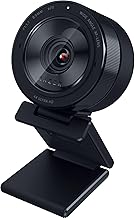
If you want a genuine upgrade over a laptop's built-in camera, these two sit at the top of the consumer webcam market for very different reasons — one for raw image quality, one for AI-driven framing. Worth a quick correction up front: some older buying guides compare the Razer Kiyo Pro Ultra against the original Insta360 Link, but that model topped out at 1080p and has been replaced by the Insta360 Link 2, which is the actual current 4K product in this lineup — that's the comparison below. This is based on manufacturer specifications and published spec-sheet data; we don't test webcams in-house.
Some links below are affiliate links — we may earn a commission if you buy through them, at no extra cost to you. See our full disclosure.
The quick answer
Get the Razer Kiyo Pro Ultra if image quality is your top priority — its 1/1.2" sensor is the largest ever put in a consumer webcam, and it captures roughly 3.9x more light than typical webcams, which shows up directly in low-light video calls and streams. Get the Insta360 Link 2 if you want AI-driven framing — its motorized 2-axis gimbal physically tracks you around the frame instead of digitally cropping, at a lower price than the Razer. If neither's AI or sensor size matters to you and you just want solid, reliable 4K, the Logitech MX Brio is a well-reviewed value pick at a similar price to the Link 2.
Check current price on the Razer Kiyo Pro Ultra →
Comparison at a glance
| Feature | Razer Kiyo Pro Ultra | Insta360 Link 2 |
|---|---|---|
| Price | Check current price | Check current price |
| Sensor size | 1/1.2" (Sony STARVIS 2) | 1/2" |
| Max resolution/fps | 4K, with an ultra-large-aperture (F/1.7) lens | 4K at 30fps, 1080p at 60fps |
| HDR | Yes | Yes |
| Low-light performance | ~3.9x more light captured than typical webcams | Good for the sensor class, not class-leading |
| Auto-tracking / AI | AI-powered face tracking (digital) | Motorized 2-axis gimbal, physically follows you |
| Mic | Built-in | Built-in, with AI noise cancelling |
| Mounting | Standard clip mount | Standard clip/desk mount |
| Software | Razer Synapse | Insta360 Link Controller app |
| Best for | Best possible image and low-light quality | Framing flexibility, presentations, whiteboard/desk views |
Razer Kiyo Pro Ultra: overview
The Kiyo Pro Ultra's entire pitch is its sensor: a 1/1.2" Sony STARVIS 2 sensor with 2.9-micrometer pixels, which Razer states is the largest sensor ever used in a webcam, paired with an F/1.7 aperture lens. That combination captures around 3.9x more light than a typical webcam, which is where the real-world difference shows up — noticeably cleaner, brighter video in dim rooms where most webcams show grain or need extra lighting. It also includes AI-powered face tracking and an HDR mode, though its price sits well above the Insta360 Link 2.
Insta360 Link 2: overview
The Link 2 is Insta360's second-generation AI webcam, a real jump from the original Link — the earlier model maxed out at 1080p, while the Link 2 is a genuine 4K/30fps webcam with HDR support, at $100 less than the original's launch price. Its signature feature is a motorized 2-axis gimbal that physically pans and tilts the camera to keep you framed as you move, rather than digitally cropping into a static wide shot the way most "AI tracking" webcams work. It also includes gesture controls, whiteboard and desk-view modes, and AI noise-cancelling on its built-in mic.
Sensor size & low-light: the decisive spec
This is genuinely the deciding factor between these two. The Kiyo Pro Ultra's 1/1.2" sensor is more than twice the surface area of the Link 2's 1/2" sensor, and larger sensors capture more light per pixel — which is exactly why Razer's low-light claims are as strong as they are. If you regularly call or stream in a dim room without good lighting, the Kiyo Pro Ultra will show a visibly cleaner image. In a well-lit room, the gap narrows considerably and the Link 2's other features become more relevant to the decision.
Resolution, FPS & HDR
Both are true 4K webcams with HDR support — a meaningful point since the original Insta360 Link wasn't. The Link 2 also offers a 1080p/60fps mode for smoother motion at lower resolution, useful for fast-paced content. The Kiyo Pro Ultra also offers 1080p at 60fps (alongside 1440p at 30fps and uncompressed 4K at 24fps), so both cover smoother lower-resolution output; the Razer's case still rests on image quality rather than frame rate.
AI tracking, framing & gestures: Insta360's edge
This is where the Link 2 pulls ahead. Its 2-axis motorized gimbal physically moves the camera to keep you centered and correctly exposed as you walk around a room or lean in and out of frame — a meaningfully different (and generally smoother) result than webcams that just digitally crop and zoom into a fixed wide shot. It also supports gesture controls (waving to trigger framing changes) and dedicated whiteboard/desk-view modes useful for teaching or presenting. The Razer's AI face tracking is digital, not physical, so it can reframe within the shot but can't physically follow you the way the Link 2's gimbal does.
Field of view & mic quality
Both include usable built-in microphones, with the Link 2 specifically adding AI noise cancelling. Field of view specs favor whichever webcam better fits your use case: Razer's lens is built around image quality more than an ultra-wide FOV, while Insta360's gimbal effectively extends usable "framing range" beyond what a fixed FOV lens offers, since the camera itself moves rather than relying purely on the lens's field of view.
Software & mounting
Razer Synapse handles the Kiyo Pro Ultra's settings — exposure, white balance, AI tracking toggle — and integrates with Razer's broader ecosystem if you already use their peripherals. The Insta360 Link Controller app manages the Link 2's gimbal behavior, gesture controls, and view modes. Both mount via a standard clip; neither requires a separate capture card or complex setup.
Check the current Razer Kiyo Pro Ultra price → · Check the current Insta360 Link 2 price →
Pros and cons
Razer Kiyo Pro Ultra - ✅ Largest sensor ever in a consumer webcam - ✅ Best-in-class low-light performance - ✅ HDR mode, AI face tracking - ❌ Highest price of the group - ❌ No physical/gimbal tracking
Insta360 Link 2 - ✅ Motorized gimbal physically tracks you - ✅ Genuine 4K/HDR — a real jump from the original Link - ✅ Gesture controls, whiteboard/desk views, lower price - ❌ Smaller sensor, less impressive in low light - ❌ AI tracking software can be inconsistent (per reviewer coverage)
Verdict — choose Razer if / choose Insta360 if
Choose the Razer Kiyo Pro Ultra if image quality and low-light performance are what matter most to you, and you're willing to pay a premium for the largest sensor in this category.
Choose the Insta360 Link 2 if you want a camera that physically follows you around a room, value presentation-friendly features like whiteboard/desk views, and want to spend less.
Consider the Logitech MX Brio if you just want a dependable 4K webcam without paying for either the Razer's sensor or the Insta360's gimbal.
See also
- Razer Kiyo Pro Ultra — full review
- Insta360 Link 2 — full review
- Best Webcam for Remote Work and Video Calls
FAQ
Which webcam is better in low light? The Razer Kiyo Pro Ultra, by a clear margin — its 1/1.2" sensor is more than double the surface area of the Link 2's 1/2" sensor and captures roughly 3.9x more light, which shows up directly as a cleaner, brighter image in dim rooms.
Does Insta360 Link 2 need a subscription? No. The Link 2's gimbal tracking, gesture controls, and view modes work through the free Insta360 Link Controller app with no subscription required.
Which works with OBS/Streamlabs? Both function as standard UVC webcams and work with OBS, Streamlabs, and other capture software. Advanced features like the Link 2's gimbal tracking and view-switching, or Razer's AI face tracking, are controlled through each brand's own app rather than inside OBS/Streamlabs directly.
The Workflow Guide publishes independent research and comparisons for remote workers, creators, and small teams. We do not test webcams in-house; this guide is based on manufacturer specifications and published spec-sheet data, and is reviewed by our editor before publishing.
Connection, audio, light, camera, desk and power, in the order that matters. Free 2-page PDF, no spam.
No spam. Unsubscribe anytime.
Products compared
Based on published specs and owner reviews — not hands-on testing.
- Razer Kiyo Pro UltraCheck price →
- Insta360 Link 2Check price →
Founder of The Workflow Guide — an IT professional who researches home-office gear and productivity software from specs, documentation and published reviews. Full bio →