Razer Kiyo Pro Ultra 4K Webcam: Specs, Pros & Cons (2026)
By The Workflow Guide
The Quick Answer
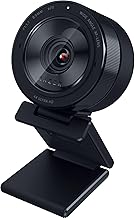
The Razer Kiyo Pro Ultra is a premium USB webcam built around an unusually large 1/1.2″ Sony STARVIS 2 sensor and a bright f/1.7 lens — hardware aimed at looking good in dim rooms and getting natural background blur without software. It records 4K at 30 fps, has face-tracking autofocus, HDR, a built-in mic and a built-in shutter.
Verdict: A strong pick if you're on Windows and your desk lighting isn't great, or you stream and want a camera-like look. If you're on a Mac, know that Razer only supports basic plug-and-play video there — the advanced settings need Razer Synapse on Windows — so a camera with full macOS support may suit you better.
Key Specs
| Spec | Razer Kiyo Pro Ultra |
|---|---|
| Sensor | 1/1.2″ Sony STARVIS 2, 2.9 μm pixel size |
| Lens | Custom f/1.7 aperture |
| Video | Raw 4K 30 fps sensor input; outputs uncompressed 4K 24 fps, 1440p 30 fps or 1080p 60 fps |
| HDR | Yes, at 30 fps |
| Focus / exposure | Face-tracking autofocus and auto exposure |
| Background blur | Optical (from the lens), no software needed |
| Microphone | Built-in |
| Privacy | Built-in shutter, plus a separate lens cover |
| Software | Razer Synapse (Windows); on-board memory keeps your last saved settings |
| Compatibility | Full control on Windows; plug-and-play basic video capture on macOS (advanced features not supported) |
Specs per the Amazon product listing (the product our link goes to) and Razer's product page.
What Stands Out
The sensor. At 1/1.2″ with 2.9 μm pixels, the sensor is much larger than typical webcam sensors, which is what lets it gather more light. Paired with the f/1.7 lens, that's the main reason to pay for this camera over a cheaper 1080p model.
Background blur from the lens. The wide aperture softens the background optically, so you get separation between you and your room without relying on a video-call app's software blur.
Flexible output. You choose between uncompressed 4K at 24 fps, 1440p at 30 fps, or 1080p at 60 fps — the last is useful if you stream and want smoother motion.
Settings that stick. On-board memory keeps your last saved configuration, so once you've tuned it in Synapse it looks the same on another Windows PC.
Trade-offs and Who Should Skip It
- Mac users get the basics only. Razer states advanced features and software control aren't supported on macOS.
- 4K tops out at 30 fps (24 fps uncompressed). If you want 4K at 60 fps, look elsewhere.
- It's overkill for simple video calls. Most meeting apps compress video heavily; if calls are all you do, a good 1080p webcam costs far less.
Alternatives
- Logitech MX Brio — Logitech's 4K webcam: see the Logitech MX Brio page.
- Insta360 Link 2 — a 4K webcam with a motorised gimbal that follows you: see the Insta360 Link 2 page.
- On a budget? The Razer Kiyo V2 or Logitech C922x cover everyday calls; see also Logitech C922x vs Razer Kiyo Pro.
- Comparing more options? Our best webcam for remote work guide covers the field.
The Workflow Guide publishes independent research and comparisons. We do not test products in-house; this page is based on the manufacturer's listing and product page (linked above).
Connection, audio, light, camera, desk and power, in the order that matters. Free 2-page PDF, no spam.
No spam. Unsubscribe anytime.
Razer Kiyo Pro Ultra 4K Webcam
Our pick, based on published specs and owner reviews — not hands-on testing.
Check Price on Amazon →Founder of The Workflow Guide — an IT professional who researches home-office gear and productivity software from specs, documentation and published reviews. Full bio →