Razer Kiyo V2 Streaming Webcam: Full Rundown (2026)
This is an affiliate link — we may earn a commission at no extra cost to you.
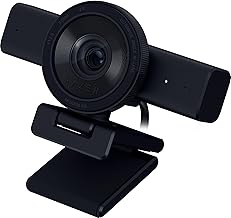
The Kiyo V2 is Razer's mid-priced 4K webcam: an 8.3MP Sony STARVIS sensor that records up to 4K at 30fps or 1080p at 60fps, with a 93° field of view, autofocus, HDR, and a built-in privacy shutter [1]. It launched in October 2025 at $149.99, half the price of Razer's Kiyo Pro Ultra [1]. Each Kiyo V2 also comes with a lifetime Camo Studio Pro license [2]. This page is based on manufacturer specifications and published professional reviews; we don't test webcams in-house.
Quick verdict
Reviewers rate it as strong value. Windows Central called it "a fantastic option for the price" and said its image quality can go "toe-to-toe" with $200 webcams [2]. Tom's Hardware praised its auto-exposure and white balance [1]. Two caveats come up in both reviews: Razer's own Synapse software is weak, and the camera is bulky and needs a free USB-C port with its included cable to deliver 4K [1][2].
Full specs
| Spec | Razer Kiyo V2 |
|---|---|
| Launch price | $149.99 (October 2025) [1] |
| Sensor | 8.3MP Sony STARVIS [1] |
| Video modes | 4K/30, 1440p/30, 1080p at 60/30/24, 720p at 60/30 [1] |
| Field of view | 93° diagonal [1] |
| Zoom | Up to 4x (digital, set in Synapse) [1] |
| Focus | Autofocus and manual [1] |
| HDR | Yes (at 30fps) [1] |
| Microphones | Built-in stereo [1] |
| Connection | Detachable 6.5 ft USB-C to USB-C cable [1] |
| Mount | Built-in L-shaped monitor mount (tilt + 360° swivel), 1/4-inch tripod thread [1] |
| Privacy | Built-in twist shutter [1][2] |
| Size / weight | 4.6 × 2.6 × 2.9 in, 8.99 oz [1] |
| Software | Razer Synapse; lifetime Camo Studio Pro license included [1][2] |
What stands out
- Image quality for the price. Windows Central found color reproduction "spot on," low-light performance "respectable," and autofocus accurate if occasionally slow [2]. Tom's Hardware called the out-of-box white balance "almost perfect" [1].
- Camo Studio Pro included. Windows Central values the lifetime license at about $100 and says Camo's auto-framing makes good use of the wide lens to keep you in frame [2]. This is where most of the useful software features live.
- A real privacy shutter. Twist the ring around the lens and the shutter closes — reviewers at both outlets liked it [1][2].
- Flexible mounting. The monitor mount tilts and swivels 360°, and there's a tripod thread underneath [1].
What to know before buying
- Needs a free USB-C port. Tom's Hardware found it must be plugged into a USB-C port with the included cable to get the full 4K picture — awkward if your ports are already taken [1].
- It's big and heavy for a webcam. 8.99 oz and 4.6 inches wide [1]; Tom's Hardware suggests it could be a liability on a laptop lid.
- Very wide default view. The 93° field of view shows a lot of your room; you'll likely zoom in through software [1].
- Synapse is basic. Windows Central called Synapse "essentially useless" beyond claiming the Camo license [2]; Tom's Hardware found it clunky but workable [1].
- Skin tones can blow out. Windows Central saw a tendency to overexpose lighter skin tones [2].
- Built-in mics are average. Tom's Hardware recommends using almost any other mic [1] — see our USB microphone guide.
Who it's for
- Good fit: remote workers and streamers who want 4K and good auto-exposure without paying $200+; anyone who will use Camo Studio.
- Maybe: laptop-only users — check you have a spare USB-C port and that the lid can carry the weight.
- Skip it: if you want the best low-light picture regardless of price — the Kiyo Pro Ultra still looks better [1].
FAQ
Is the Razer Kiyo V2 4K? Yes — up to 4K at 30fps, and 1080p at up to 60fps [1].
Does the Kiyo V2 have a privacy shutter? Yes, a built-in twist shutter [1][2].
Does the Kiyo V2 have auto-framing? Auto-framing is available through the included Camo Studio Pro software [2].
Will it work over USB-A? Tom's Hardware found it needs a USB-C port and the included cable for full 4K quality [1].
Bottom line
The Kiyo V2 delivers 4K image quality and accurate auto-exposure at $150, and the bundled Camo Studio Pro license adds software features rivals charge for. Plan for its size, its appetite for a USB-C port, and Razer's thin Synapse app, and it's one of the better-value webcams for calls and streaming.
Check the current price on the Razer Kiyo V2 →
See also
- Best webcams for remote work and video calls (2026)
- Logitech C922x vs Razer Kiyo Pro
- Razer Kiyo Pro Ultra
Sources
- $149.99 price and October 2025 release, 8.3MP Sony STARVIS sensor, video modes, 93° FOV, 4x zoom, autofocus, HDR, stereo mics, 6.5 ft USB-C cable and USB-C port requirement, L-shaped mount with tripod thread, privacy shutter, 4.6 × 2.6 × 2.9 in / 8.99 oz, auto-exposure and white balance results, Synapse, average mics, Kiyo Pro Ultra comparison — Tom's Hardware, Razer Kiyo V2 review
- Lifetime Camo Studio Pro license (~$100 value), Camo auto-framing, image quality vs $200 webcams, color, low light, autofocus, overexposed skin tones, Synapse criticism, privacy shutter, verdict — Windows Central, Razer Kiyo V2 review
The Workflow Guide publishes independent research on tech tools and gear. We do not test webcams in-house; this page is based on manufacturer specifications and published professional reviews.
Connection, audio, light, camera, desk and power, in the order that matters. Free 2-page PDF, no spam.
No spam. Unsubscribe anytime.
Razer Kiyo V2 Streaming Webcam
Our pick, based on published specs and owner reviews — not hands-on testing.
Check Price on Amazon →Founder of The Workflow Guide — an IT professional who researches home-office gear and productivity software from specs, documentation and published reviews. Full bio →