Logitech C922x Pro Stream Webcam: Specs, Review Roundup & Who It's For (2026)
This is an affiliate link — we may earn a commission at no extra cost to you.
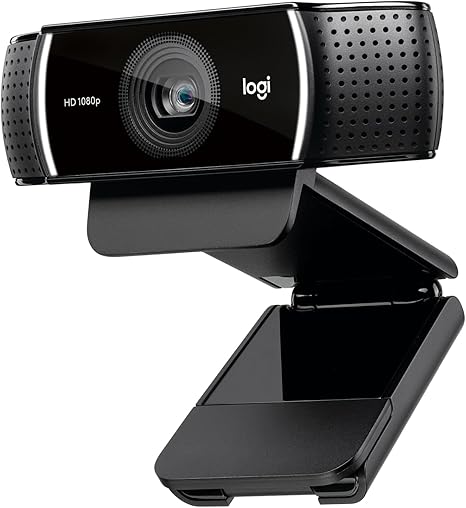
The C922x is the Amazon version of Logitech's C922 Pro Stream, a 1080p webcam that launched on September 30, 2016 at $99.99 [3]. It's still one of the most widely bought webcams for video calls and entry-level streaming, mostly because it does the basics reliably at a modest price. This page is based on Logitech's published specifications and independent reviews; we don't test webcams in-house.
Quick verdict
If you want a clear, dependable 1080p picture on Zoom or Teams and a 60fps option for streaming, the C922x still does the job. Reviewers praise its detail and colour in good light [2][4]. Its age shows in low light, and it has no 4K, no auto-framing, and no built-in privacy shutter [2][4]. If you sit in a dim room or want the sharpest possible image, a newer 4K webcam is the better buy.
Full specs
| Spec | Logitech C922x |
|---|---|
| Launch | September 30, 2016, $99.99 [3] |
| Video | 1080p at 30fps or 720p at 60fps [1] |
| Field of view | 78° diagonal [1] |
| Lens | Glass [1], f/2.8 [3] |
| Focus | Autofocus [1], 20-step [3] |
| Light handling | Automatic light correction [1] |
| Microphones | Dual omnidirectional (stereo) [1] |
| Mount | Monitor clip (no tripod included with the C922x) [2] |
| Privacy shutter | None [4] |
| Background removal | Via bundled XSplit software licence [2][3] |
C922x vs C922: what's the difference?
The camera hardware is identical. Logitech launched two versions at the same price: the C922, sold through Best Buy and Logitech, includes a small tripod and a 3-month XSplit licence; the C922x, sold on Amazon, drops the tripod and came with a 6-month XSplit licence instead [2][3]. If you want to set the camera on a desk or shelf rather than clip it to a monitor, the C922's tripod is the only practical difference — the C922x still has a standard tripod thread if you add your own [4].
What reviewers highlight
- Sharp, natural image in decent light. Laptop Mag found "precise details and color accuracy" [2]; Layer3 Labs describes "sharp, natural Full HD 1080p at 30fps" with reliable autofocus in typical office lighting [4].
- 720p at 60fps. The 60fps mode gives "smoother motion, which looks better on fast-moving gameplay" [4] — the feature that made it popular with streamers.
- Built-in microphones. Laptop Mag rated the stereo mics "crystal-clear" for voice [2]; Layer3 Labs calls them "usable" but notes creators usually add a dedicated mic [4].
What to know before buying
- Low light is the weak spot. Laptop Mag reported the camera "couldn't find me at all" in low light even with added lighting [2]. If your desk is dim, add a front light — see our lighting guide — or buy a camera with a larger sensor.
- Colour tint. The same review noted "a bluish tint" compared with Logitech's C920 [2].
- No modern extras. There's "no AI auto-framing, face tracking, or gesture control," no privacy shutter, and no 4K option [4].
- Background removal is finicky. Software background replacement "works quite well" in bright light but "can be finicky," occasionally cutting off part of your head [2]. Zoom and Teams' own background blur is usually simpler.
How it compares
- Razer Kiyo Pro: the most common alternative at this level. See Logitech C922x vs Razer Kiyo Pro.
- 4K webcams: for the crispest image, Layer3 Labs points to 4K models with AI image processing and built-in privacy covers as the upgrade path [4]. Our best webcams for remote work guide covers the current options.
FAQ
Is the Logitech C922x 4K? No. It records 1080p at 30fps or 720p at 60fps [1].
What's the field of view of the C922x? 78° diagonal [1] — wide enough for one or two people at a desk.
Does the C922x come with a tripod? No. The tripod comes with the C922; the C922x includes only the monitor clip [2][3].
When did the C922x come out? The C922 and C922x launched together on September 30, 2016 [3].
Does the C922x have a privacy cover? No built-in shutter [4].
Bottom line
The C922x is a proven, budget-friendly 1080p webcam that still looks good on calls in a well-lit room. Its limits are its age: weak low-light performance and none of the newer features. Add a light, or step up to a newer camera if your room is dark.
Check the current price on the Logitech C922x →
See also
- Logitech C922x vs Razer Kiyo Pro — full comparison
- Best webcams for remote work and video calls (2026)
Sources
- Resolution and frame rates, 78° diagonal field of view, glass lens, autofocus, light correction, dual omnidirectional mics — Logitech, C922 Pro Stream Webcam product page
- C922 vs C922x configurations, image quality, mic quality, low-light result, bluish tint, background removal — Laptop Mag, Logitech C922 Pro Stream Webcam review
- Launch date, $99.99 price, C922 and C922x SKUs, f/2.8 lens, 20-step autofocus, XSplit licence lengths — PC Perspective, Logitech releases C922 Pro Stream webcam
- Office-lighting image quality, 720p60 motion, mic assessment, no auto-framing or privacy shutter, tripod thread, 4K upgrade path — Layer3 Labs, Logitech C922x review
The Workflow Guide publishes independent research on tech tools and gear. We do not test webcams in-house; this page is based on manufacturer specifications and published professional reviews.
Connection, audio, light, camera, desk and power, in the order that matters. Free 2-page PDF, no spam.
No spam. Unsubscribe anytime.
Logitech C922x HD Pro Webcam
Our pick, based on published specs and owner reviews — not hands-on testing.
Check Price on Amazon →Founder of The Workflow Guide — an IT professional who researches home-office gear and productivity software from specs, documentation and published reviews. Full bio →