Logitech MX Keys for Business: Specs, Logi Bolt Security & Who It's For (2026)
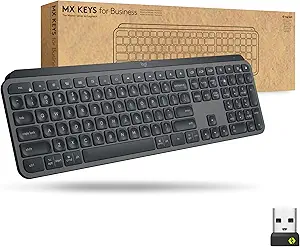
This is an affiliate link — we may earn a commission at no extra cost to you.
MX Keys for Business is the business edition of Logitech's popular MX Keys: a full-size, backlit, low-profile wireless keyboard with a number pad, designed to be rolled out across a company. The main difference from the consumer model is the Logi Bolt receiver, which Logitech describes as "fully encrypted and FIPS secure" [1]. This page is based on Logitech's published specifications and independent reviews; we don't test keyboards in-house.
Quick verdict
If you type all day at a desk, want a quiet full-size keyboard with a numpad that switches between up to three computers — and especially if your IT team cares about wireless security — MX Keys for Business is a strong, well-established choice [1]. If you want a mechanical feel, or very bright backlighting, look elsewhere.
Full specs
| Spec | Logitech MX Keys for Business |
|---|---|
| Layout | Full-size with number pad and arrow keys [1] |
| Keys | Low-profile "Perfect Stroke" keys, spherically dished with matte coating [1] |
| Backlight | Smart backlighting — hand-proximity sensor turns it on; ambient light sensor adjusts brightness [1] |
| Battery | Rechargeable 1,500mAh; up to 10 days with backlight, up to 5 months with backlight off [1] |
| Charging | USB-C — you can keep typing while it charges [1] |
| Connection | Logi Bolt USB receiver or Bluetooth Low Energy (5.0+) [1] |
| Multi-device | Easy-Switch between up to 3 computers [1] |
| OS support | Windows, macOS, Linux, ChromeOS, iPadOS, iOS, Android; full feature support on Windows/macOS via Logi Options+ [1] |
| Dimensions | 430.2 × 131.6 × 20.5 mm [1] |
| Weight | 810 g [1] |
| Materials | 26% post-consumer recycled plastic; low-carbon aluminium; FSC-certified packaging [1] |
| Warranty | 2-year limited hardware warranty [1] |
What "for Business" actually means
Logitech positions the business edition around the Logi Bolt receiver rather than Logitech's older Unifying receiver [1]. Logitech says that, when used with the Bolt receiver, the connection is "fully encrypted and FIPS secure" [1] — FIPS being the US government security standard that many corporate and public-sector IT policies reference.
For a home user, the Bolt receiver is a convenience rather than a necessity — the keyboard also connects over Bluetooth [1]. For a company deploying hundreds of keyboards, the security certification is often the deciding factor.
What reviewers highlight
Reviews of the MX Keys family focus on the same strengths and weaknesses. Tom's Guide, reviewing the current consumer MX Keys S, says its "concave keycaps and scissor switches make for an excellent typing experience" and lists "lovely to type on," intuitive companion software, and good battery life among its pros [2].
What to know before buying
- Backlighting is dim. Tom's Guide's main complaint about the MX Keys S is "limited and dim backlighting" [2]. The backlight is smart — it wakes when your hands approach [1] — but don't expect it to be bright.
- No place to store the receiver. Tom's Guide also notes "no onboard dongle storage" [2], so a Bolt receiver can get lost when you travel.
- Battery life depends on the backlight. About 10 days with the backlight on, up to 5 months with it off [1].
- It's not mechanical. These are low-profile scissor-style keys. If you prefer a mechanical keyboard, see MX Keys S Combo vs Keychron Q6 Pro or our best mechanical keyboard guide.
- Full-size footprint. At 430 mm wide [1], it takes more desk space than a compact keyboard; the numpad is the trade-off.
FAQ
What's the difference between MX Keys and MX Keys for Business? The business edition is built around the Logi Bolt receiver, which Logitech says is fully encrypted and FIPS secure [1].
Does MX Keys for Business work with a Mac? Yes — Logitech lists macOS with full feature support through Logi Options+ [1].
How long does the battery last? Up to 10 days with backlighting, or up to 5 months with backlighting off [1].
Can it connect to more than one computer? Yes, up to three, switched with the Easy-Switch keys [1].
Does it have a number pad? Yes, it's full-size with a numpad [1].
Bottom line
MX Keys for Business is a quiet, comfortable, full-size keyboard with good multi-device support and a security story IT departments can sign off on. Accept dim backlighting and a non-mechanical feel, and it's one of the safest choices for a full-time desk.
Check the current price on the Logitech MX Keys (Business) →
See also
- MX Keys S Combo vs Keychron Q6 Pro — full comparison
- Logitech MX Anywhere 3S travel mouse
- Home office setup guide (2026)
Sources
- Logi Bolt security (encrypted, FIPS), keys, smart backlight, battery, USB-C charging, connectivity, Easy-Switch, OS support, dimensions, weight, recycled materials, warranty — Logitech, MX Keys for Business product page
- Typing experience, pros, dim backlighting, no dongle storage — Tom's Guide, Logitech MX Keys S review
The Workflow Guide publishes independent research on tech tools and gear. We do not test keyboards in-house; this page is based on manufacturer specifications and published professional reviews.
Connection, audio, light, camera, desk and power, in the order that matters. Free 2-page PDF, no spam.
No spam. Unsubscribe anytime.
Logitech MX Keys Wireless Illuminated Keyboard for Business
Our pick, based on published specs and owner reviews — not hands-on testing.
Check Price on Amazon →Founder of The Workflow Guide — an IT professional who researches home-office gear and productivity software from specs, documentation and published reviews. Full bio →