Anker 7-in-1 USB-C Hub (4K HDMI, 85W PD, USB 3.0, SD Card Reader): Full Rundown (2026)
This is an affiliate link — we may earn a commission at no extra cost to you.
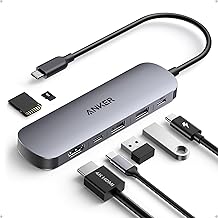
This Anker USB-C hub turns one USB-C port on a laptop into seven: an HDMI output that runs 4K at 60Hz, two USB-A ports, a USB-C data port, SD and microSD card slots, and a USB-C power input that passes up to 85W through to your laptop [1][2]. It's a compact, single-cable hub rather than a dock. This page is based on Anker's published specifications; we didn't find an independent lab review of this model, and we don't test hubs in-house.
Quick verdict
For a USB-C-only laptop that needs one external monitor, a couple of USB-A accessories, and a card reader, this hub covers the common gaps in one small adapter — and the 4K@60Hz HDMI output is smoother than the 4K@30Hz many cheaper hubs are limited to [1][2]. It isn't a dock: there's no Ethernet and only one video output, and the USB-C port carries data only [2].
Full specs
| Spec | Anker USB-C Hub (7-in-1) |
|---|---|
| Video | 1× HDMI, up to 4K@60Hz [1][2] |
| USB-A | 2× USB-A 3.0, 5Gbps [2] |
| USB-C data | 1× USB-C, 5Gbps, data only (no video or charging) [2] |
| Card readers | SD + microSD (TF) [2] |
| Power input | USB-C PD input, up to 100W [2] |
| Laptop charging | Up to 85W pass-through [1][2] |
| Warranty | 18 months [2] |
What stands out
- 4K at 60Hz over HDMI. Anker specifies 4K@60Hz [1][2] — smooth enough for everyday desktop work on a 4K monitor such as the LG 27US500-W. Hubs limited to 4K@30Hz feel laggy when you move windows around.
- Pass-through charging. Plug your laptop charger into the hub and it keeps charging the laptop (up to 85W) while every other port is in use [1][2].
- 5Gbps data on three ports. Both USB-A ports and the USB-C data port run at 5Gbps [2] — fine for external drives, keyboards, and webcams.
- Card readers built in. SD and microSD slots save carrying a separate reader for camera cards [2].
What to know before buying
- The USB-C port is data only. Anker notes only the HDMI port outputs video and the USB-C port is for data transfer [2]. You can't run a second monitor from it.
- One external display. If you need two monitors or wired Ethernet, look at a dock — see our USB-C hub and docking station guide.
- Bring a strong enough charger. The PD input is rated up to 100W and laptop charging up to 85W [2]; the difference is power the hub uses itself. To get the full 85W to your laptop, plug in a charger of around 100W — a smaller charger leaves less for the laptop.
- Older Anker 7-in-1 models are different. The earlier Anker 341 (A8346) hub runs HDMI at 4K@30Hz [3]. Check the listing says 4K@60Hz if refresh rate matters to you.
Who it's for
- Good fit: MacBook and other USB-C-only laptop users who want one monitor, USB-A accessories, and an SD reader through a single adapter.
- Maybe: hybrid workers who move between desks — it's small enough to travel, but a monitor with a USB-C hub (like the Dell P2725QE) removes the need for one at home.
- Skip it: if you need dual monitors, Ethernet, or Thunderbolt speeds — that's dock territory, e.g. the CalDigit TS5 Plus.
FAQ
Does this Anker hub support 4K at 60Hz? Yes, over its HDMI port [1][2].
Can the USB-C port drive a second monitor? No — Anker says the USB-C port is data only [2].
How much power does it pass through to a laptop? Up to 85W, from a USB-C charger plugged into the PD input (rated up to 100W) [2].
Does it have an Ethernet port? No. The seven connections are HDMI, two USB-A, USB-C data, SD, microSD, and the PD input [2].
Bottom line
This is a solid single-monitor travel hub: 4K@60Hz HDMI, 5Gbps ports, both card slots, and 85W pass-through charging in one small adapter. Pair it with a ~100W charger for full laptop charging, and step up to a dock if you need two screens or Ethernet.
Check the current price on the Anker 7-in-1 USB-C Hub →
See also
- Best USB-C hubs and docking stations for laptops (2026)
- Cable Matters USB-C to HDMI adapter
- UGREEN Nexode Pro 100W GaN charger
Sources
- 7-in-1 USB-C hub, 4K@60Hz HDMI, 85W charging — Anker, USB-C Hub (7-in-1) product page
- HDMI 4K@60Hz (only HDMI outputs video; USB-C port data only), 2× USB-A 3.0 + 1× USB-C at 5Gbps, USB-C PD input up to 100W, up to 85W laptop charging, SD + TF slots, 18-month warranty — Anker's Amazon listing for the USB-C Hub (7-in-1)
- Anker 341 (A8346) HDMI limited to 4K@30Hz — Anker, 341 USB-C Hub (7-in-1) product description
The Workflow Guide publishes independent research on tech tools and gear. We do not test hubs in-house; this page is based on Anker's published specifications.
Connection, audio, light, camera, desk and power, in the order that matters. Free 2-page PDF, no spam.
No spam. Unsubscribe anytime.
Anker 7-in-1 USB-C Hub
Our pick, based on published specs and owner reviews — not hands-on testing.
Check Price on Amazon →Founder of The Workflow Guide — an IT professional who researches home-office gear and productivity software from specs, documentation and published reviews. Full bio →